

warehouse insider
Discover how StorTRACK automates case counting on full and partial pallets using computer vision and depth mapping. Improve warehouse accuracy and reduce manual labor.
Distribution Centers (DCs) and warehouses often rely on a mix of traditional setups and evolving automation solutions. Most store inventory in rack systems as full pallets, with the bottom 1–2 levels used as “pick levels” for cases or partially picked pallets, while upper levels serve as “reserve locations.” Cycle counting these reserve locations is relatively simple — reading the Pallet ID (or LPN) and then verifying its location. Because full pallets typically contain a unique SKU and a known number of cases, the WMS can determine inventory totals and locations accurately.
However, over time, warehouse inventory accuracy issues still accumulate. It is common practice to conduct manual physical inventory processes, where operations shut down for manual reconciliation of on-hand inventory against WMS records.
While this setup works for conventional operations, it also reveals the inefficiencies of manual processes and highlights the need for automated cycle counting and pallet scanning solutions that improve scalability, accuracy, and efficiency.
In many DCs, picking occurs at all rack levels due to high SKU volume, making it impractical to limit access to just the lower racks. This is especially true in sectors like food distribution and automotive parts. When cases are picked from various levels, partial pallets result. These are harder to count since the remaining cases may be behind the pallet’s front-facing edge. The cycle counter must not only confirm the Pallet ID and location but also manually count the remaining cases, adding complexity and increasing the chance of error.
Automated cycle counting solutions help overcome these challenges by scanning and validating pallet content — even partial pallets — without requiring manual intervention. This reduces the manual physical inventory processes burden that plagues many warehouses with unnecessary labor costs and operational disruptions.
An example of a full pallet is shown Figure 1; different examples of partial pallets are shown in Figure 2.
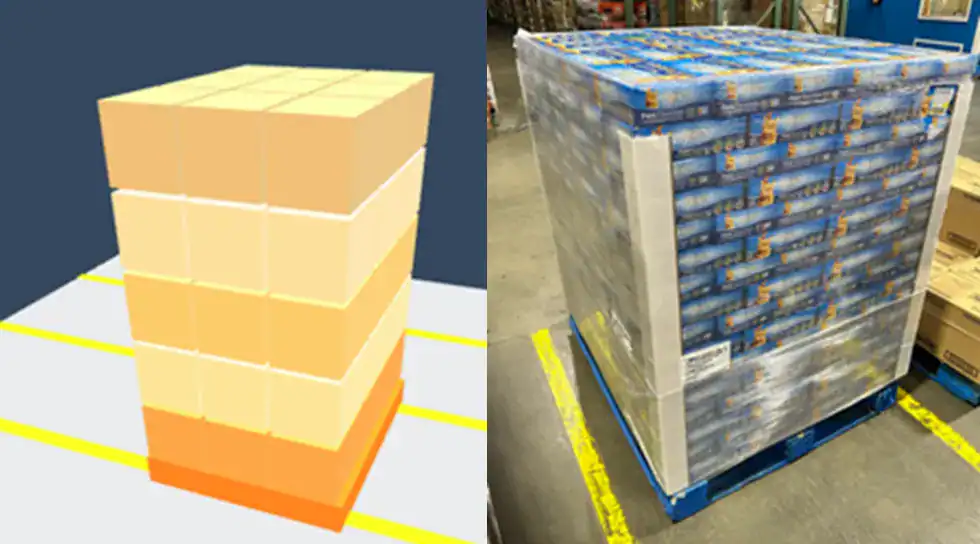
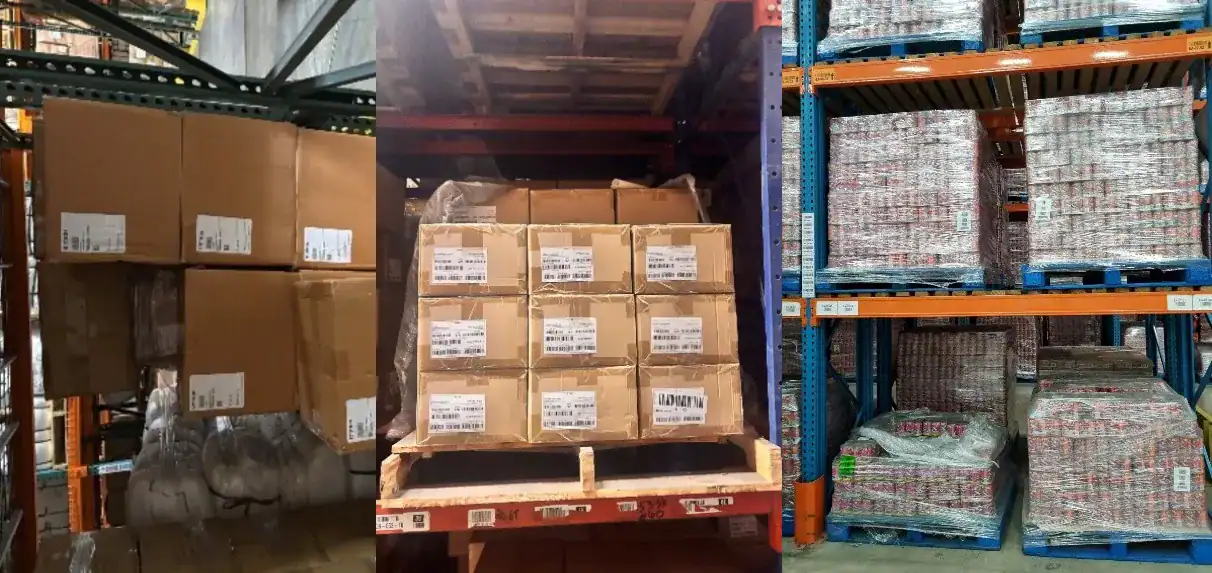
Automated cycle counting solutions are usually based on computer vision or barcode reading, both of which require visual line of sight to the items on the rack. Therefore, such solutions are only able to look at the “face” of a rack. Even in such situations, one can usually accurately infer the number of cases on a partially picked pallet – under certain assumptions as listed below.
1. The pallets should be stored single deep in the racks. Pallets that are hidden behind another pallet cannot be seen from the aisle.
2. The number of cases on the original full pallet should be known. This can come from the Ti-Hi structure of the pallet or from information contained in the WMS. It is not a requirement that the cases should be arranged in a Ti-Hi manner on the pallet.
3. All the cases on the pallet are assumed to be single SKU and of uniform dimensions.
4. When the pallet is placed on the rack shelf and cases are picked from it, cases *should not* be picked from the “back” of the pallet. In other words, pickers should pick from the aisle, and every case picked should result in a visible “missing case” when viewed from the aisle. Examples of cases picked from the front and picked from the back are shown in Figure 3 and Figure 4.

If these four key assumptions are met, Vimaan’s StorTRACK can infer the number of cases remaining in a partially picked pallet. The methodology used by the solution is as follows:
1. As StorTRACK moves parallel to the surface of the rack, it not only captures images of each pallet and case; it also creates a “depth map” that measures the distance from StorTRACK to the item being mapped. This generates a 3D point cloud which provides a high resolution map of every point on the inventory items with respect to the surface of the rack. If certain items are protruding from the surface of the rack, these can be measured; conversely, all points that are recessed from the rack surface are also accurately mapped.
2. The depth map generated by StorTRACK has dimensional fidelity, which means that it accurately measures the distance by which a certain point is either recessed or protruding from the surface of the shelf.
3. The depth map for a full pallet is therefore a plane which represents the front surface of the pallet. The dimensions of this plane represent the width and height of the front face of the pallet.
4. If a pallet is built in a Ti-Hi manner and an entire layer is picked from the pallet while it is on the shelf, the front surface will still be a plane with the same width as the original pallet, but with a height that is less than the height of the original pallet by the height of a single layer. In this manner, if entire layers are picked from a pallet, StorTRACK can use the planarity of the pallet and the width and height dimensions to determine how many layers have been picked. With this information, since StorTRACK also knows the original Ti-Hi structure and original number of cases on the pallet (Assumption #3), it can infer how many cases are still remaining on the pallet.
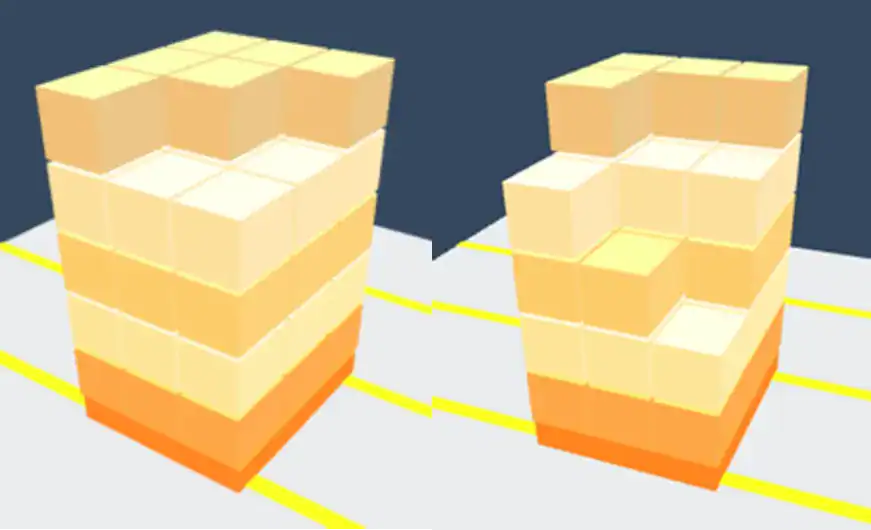
5. In a situation where a layer is partially picked, as long as cases are picked from the front, StorTRACK uses its depth map to first calculate how many layers are still complete (using Step 5 above). If a layer is incomplete, the depth map would vary across the width of the pallet. For example, if two cases have been picked from the top layer, then the depth of those two locations would increase by the depth of a case. Using this reconstruction, StorTRACK can accurately infer how many cases have been removed from any given layer. Since it also knows how many cases are on a given layer, it can also infer how many cases are remaining in that layer, and consequently, in that pallet.
Several examples of how the number of cases can change through picking and the resulting depth maps generated by StorTRACK are shown in Figure 5 and Figure 6.
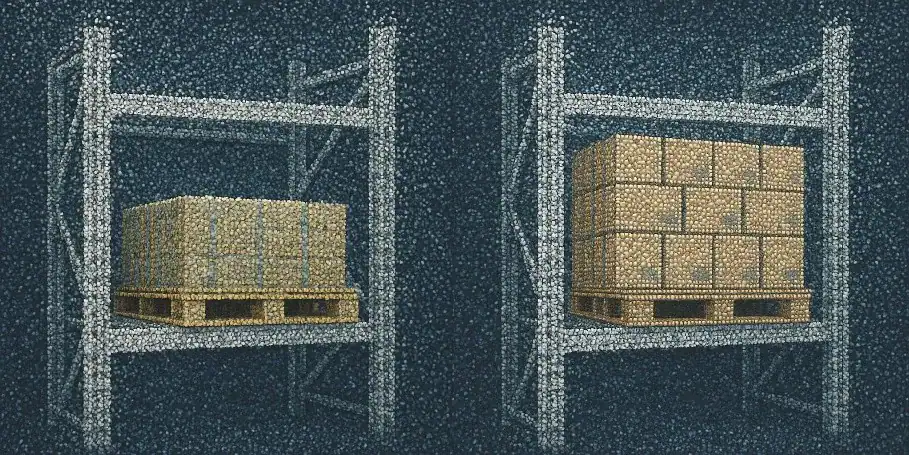
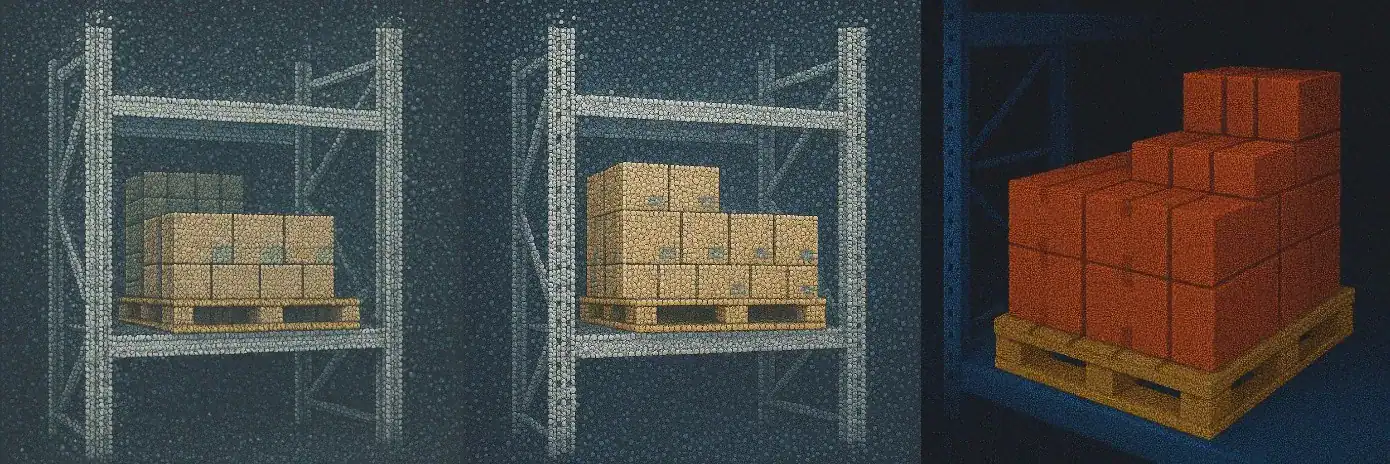
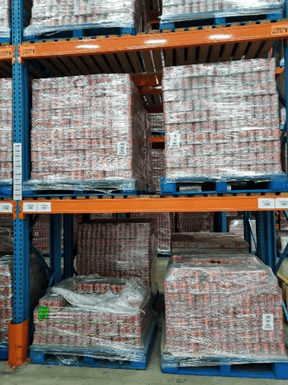
There are of course many real-life scenarios where a depth map cannot provide unambiguous case counts. For example, sometimes, pickers leave pallets partially shrink-wrapped, which results in uneven coverage of the pallet by shrink-wrap (see Figure 7 for example). Or they could disturb multiple other cases when they remove one case from the pallet. Sometimes, they don’t follow the Standard Operating Procedures and pick from the back. Other challenges may have nothing to do with picker behavior: If the case sizes are extremely small in relation to the pallet dimensions, errors in the depth maps or dimensional measurements may cause case counting or even layer counting errors. All these scenarios can generate irregular or unreliable depth maps.
In each of these scenarios, since StorTRACK automatically compares its inferred case count results against the WMS, it immediately highlights any discrepancy along with images of the location. In most cases, the image of the pallet can be viewed by the inventory clerk on a tablet or desktop and the number of layers and cases on the pallet can be counted manually just based on the image (if the assumptions hold true). In certain situations, it is not even possible to count the remaining cases on a pallet just from an image, and these specific locations will need to be verified by a cycle counter by physically visiting the bin location.
For a broader overview of the partial pallet counting problem and how computer vision solves it, read our blog post.
To learn how StorTRACK can work in your warehouse, Contact Us.
Q. What is a partial pallet and why is it harder to count than a full pallet?
A partial pallet results when cases are picked from a full pallet that’s still stored on a rack shelf, leaving behind a mix of full and empty positions. Unlike full pallets, which have a known SKU and a fixed case count verifiable via the WMS, partial pallets require a physical count of remaining cases which is a time-consuming, error-prone step that slows down cycle counting significantly.
Q. What assumptions need to be met for automated case counting to work on partial pallets?
Four conditions must hold: pallets must be stored single-deep so they’re visible from the aisle; the original full pallet case count must be known from the WMS or Ti-Hi structure; all cases on the pallet must be a single SKU and uniform in size; and pickers must pick from the front of the pallet, not the back. When cases are pulled from the back, the aisle-facing surface doesn’t reflect what’s been removed.
Q. How does StorTRACK count cases on a partial pallet?
As StorTRACK moves along the rack aisle, it captures both images and a depth map of each pallet, a 3D point cloud that measures how far each point protrudes or recedes from the rack surface. By comparing the depth profile of a partial pallet against the known dimensions of a full pallet, StorTRACK infers how many complete layers remain and how many cases have been removed from any partially picked layer.
Q. What happens when the depth map can’t give a clean count?
In scenarios with partial shrink-wrap, disturbed case stacking, or cases picked from the back, the depth map may be irregular or ambiguous. In these cases, StorTRACK automatically flags the discrepancy, surfaces an image of the location, and routes it for manual review – either a visual count from the image or a physical visit to the bin. The system never silently accepts an uncertain count.
Q. Does StorTRACK require pallets to be arranged in a Ti-Hi pattern?
No. While knowing the original Ti-Hi structure helps StorTRACK infer the total case count, the cases don’t need to remain arranged in Ti-Hi order on the pallet. StorTRACK uses the depth map geometry to reconstruct what’s present regardless of how cases are stacked, as long as the four core assumptions are met.