

warehouse insider
Creating a reliable link between the physical parcel, the correct receiving record, and the internal label used downstream
The core challenge
External carrier and supplier labels are not a common warehouse identity. If an operation cannot determine what arrived, match it to the right business record, and apply the right internal label to the same physical parcel, downstream automation begins with unreliable data.
Many operations – from large-scale distribution centers, to public institutions, to small-scale manufacturers – receive parcels from multiple suppliers, carriers, and channels. The parcel may arrive with a carrier tracking number, supplier barcode, purchase-order reference, packing label, or several labels accumulated across earlier handling steps. None may be the standardized identifier the receiving operation needs for check-in, sortation, ownership, putaway, fulfillment, or audit. Without a specially-trained Operator to know the difference, the process becomes slow and prone to error.
Vimaan’s ParcelSCAN digitizes the visible parcel, extracts candidate identifiers, applies business rules to select the correct label of interest, and provides the data needed to match the parcel to the appropriate warehouse record. Once the correct internal identity is generated, the label can be applied manually or through print-and-apply automation, with verification and exception controls protecting the parcel-to-record association.
What This Application Addresses
Why the Absence of a Common Label Creates Friction
A common internal label gives the warehouse one dependable identity for every parcel. Without it, operators must interpret whatever labels happen to be present, decide which number matters, search one or more systems, create or select a receiving record, and then make sure the newly printed label goes onto the correct parcel.
Each task is manageable in isolation. At receiving-line speed, however, the combination creates delay and multiple opportunities for error.
Three linked failure points
1. Identification is slow and inconsistent.
Different suppliers and carriers use different formats. Labels may be placed on any visible face, folded over an edge, partially damaged, or surrounded by unrelated barcodes. Operators must know which field to use and may have to rotate or rescan the parcel.
2. A successful read is not the same as a correct match.
Reading a barcode only proves that a code was detected. The operation must still determine whether it is the carrier tracking number, supplier carton ID, PO reference, product identifier, or another code—and whether that value maps to exactly one valid receiving record.
3. Label application can break the chain of identity.
Even when the correct internal label has been generated, it can be applied to the wrong parcel, placed where it cannot be read downstream, duplicated, or released before application is confirmed. Both manual and automated application require explicit rules.
A read is only valuable when it drives the correct transaction
The business outcome is not simply barcode capture. It is a controlled association among the physical parcel, the selected external identifier, the correct system record, and the newly assigned internal label.
Common operational consequences
From External Labels to a Verified Warehouse Identity
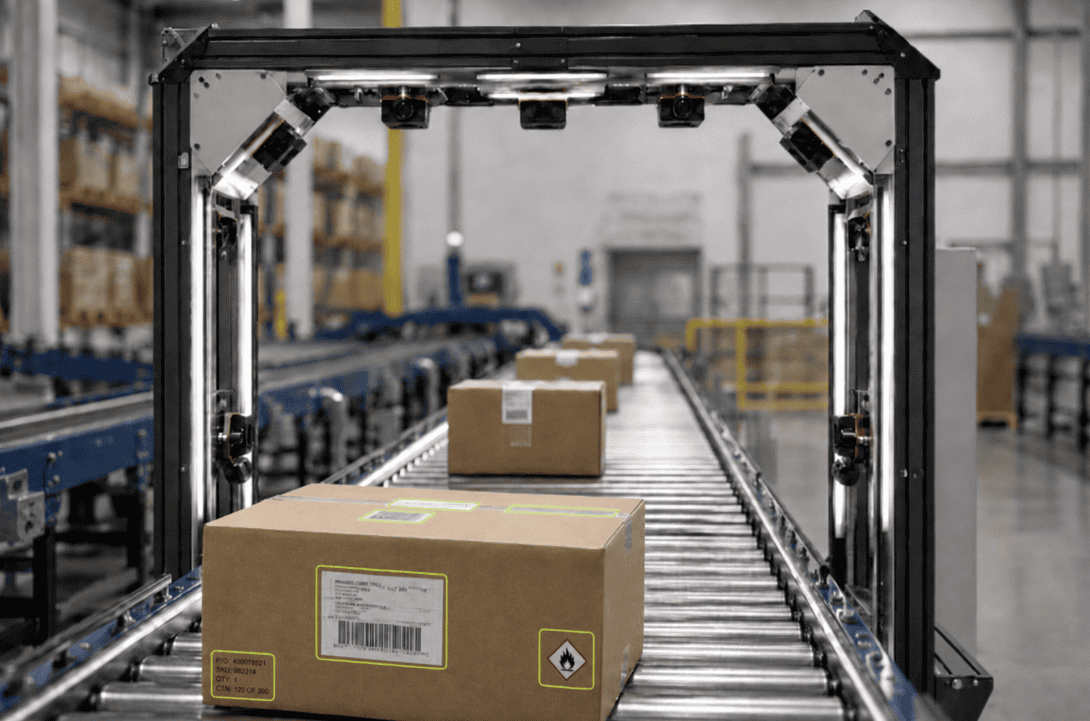
Vimaan’s ParcelSCAN supports a stepwise receiving workflow in which each decision is validated before the parcel is released. The exact system boundaries vary by deployment: ParcelSCAN may supply image, OCR, barcode, and label-location data while a WMS, WES, ERP, or integrator performs database lookup, label generation, conveyor control, and print-and-apply logic.
| Step | Control | What happens |
| 1 | Capture | Image visible parcel faces and read candidate labels |
| 2 | Identify | Select the identifier of interest using defined rules |
| 3 | Match | Query receiving data for the correct business record |
| 4 | Create | Generate or retrieve the required internal identifier |
| 5 | Apply | Release the print job and bind it to the parcel event |
| 6 | Verify | Confirm the expected label on the same physical parcel |
| 7 | Release | Continue the parcel or divert it to exception handling |
The Decision Rules Matter as Much as the Imaging
Rules may use carrier format, supplier profile, symbology, field length, label location, nearby text, shipment context, or a prioritized hierarchy. The first readable barcode is not automatically the correct one. A one-to-one match may proceed; zero-match or multi-match results should pause the transaction and prevent uncertain label generation.
What ParcelSCAN Contributes and How Exceptions are Handled
Comprehensive Data Capture and Intelligent Field Selection
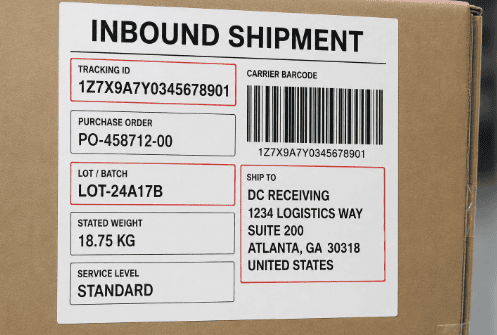
ParcelSCAN does more than search for a single predetermined barcode. It records the full set of visible information on the parcel: including barcodes, printed text, addresses, shipping references, lot, batch or manufacturing codes, stated weight, and other relevant markings. Parcel dimensions can also be captured when they are required for the receiving or routing workflow.
Vimaan’s AI and machine-learning models then determine which information is relevant to the immediate business decision. This may mean identifying the correct unique parcel identifier from several visible labels, or evaluating a combination of fields when no single value is sufficient. For example, a workflow could compare the stated weight, lot or manufacturing code, destination address, and parcel dimensions against expected receiving data before determining the correct system record or routing destination.
This creates two distinct capabilities:
This is especially valuable when routing decisions depend on printed destination-address text rather than a standardized barcode. ParcelSCAN does more than search for a single predetermined barcode. It records the full set of visible information on the parcel: including barcodes, printed text, addresses, shipping references, lot, batch or manufacturing codes, stated weight, and other relevant markings. Parcel dimensions can also be captured when they are required for the receiving or routing workflow. can interpret that address information and use it to direct parcels to the appropriate delivery center or downstream workflow.
Integration and ownership boundaries
The solution can exchange data through APIs, messages, or file-based interfaces depending on the surrounding architecture. Before deployment, responsibilities should be explicit for trigger signals, parcel tracking, OCR and barcode outputs, database lookup, internal-ID generation, print-job creation, applicator control, verification, reject handling, and the final receiving transaction.
This separation allows ParcelSCAN to operate as the parcel digitization and validation layer while the warehouse platform or system integrator retains the business transaction and material-handling logic. It also avoids embedding customer-specific receiving rules in the wrong component.
Exception handling is part of the production workflow
| Exception | Controlled Response |
| No readable identifier | Retain images, retry using alternate views, or route to operator review without generating an internal label |
| Multiple candidate identifiers | Apply label-of-interest rules; if ambiguity remains, show candidates and hold the parcel for confirmation |
| No system match | Prevent automatic receipt and label creation; route to a defined unmatched-parcel queue |
| Multiple system matches | Block automatic assignment until the correct record is resolved. |
| Print/apply failure | Keep the parcel associated with the open transaction and divert it for reprint or manual application |
| Verification failure | Do not release the parcel until the expected label is detected or the event is resolved by an authorized operator |
Visible-data boundary
ParcelSCAN can validate information visible on the parcel exterior. If required item-level, serial, country-of-origin, or other data is sealed inside a carton, the process must expose that information through standardized external labeling, an upstream data association, or a defined open-carton exception.
Label Application Options and Operational Outcomes
All profiling events are automatically stored within ViewDECK, Vimaan’s web-based visualization and analytics platform.
Choosing the right label application approach
After ParcelSCAN identifies the parcel and generates the correct internal label, the label can be applied through either a fully automated or operator-assisted workflow.
Automatic print-and-apply offers the highest level of automation and is particularly valuable for high-volume, standardized conveyor operations. However, it requires specialized equipment, precise parcel tracking and placement rules, dimension measurements, controls integration, and additional engineering, making it the more expensive option to deploy. ParcelSCAN functions as the vision and parcel identify platform in a larger system, which can be managed by a Systems Integrator or In-house team.
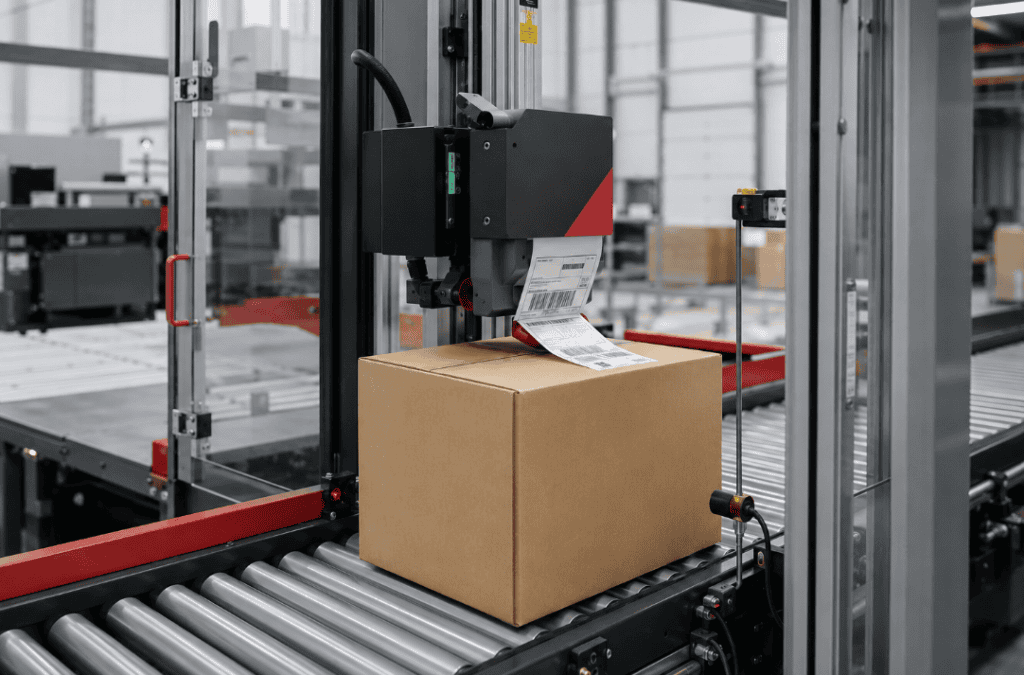
Operator-assisted application provides a lower-cost alternative. ParcelSCAN prints the correct label and presents the corresponding parcel information and placement instructions through Vimaan’s user interface. An operator then confirms the parcel and manually applies the label. This approach still reduces identification and matching errors while requiring less equipment and integration, although it retains a manual step in the receiving process.
Rules to define before production
Expected operational value
Inbound internal labeling is not a printing problem alone. It is an identity-control process. The receiving operation must determine what the parcel is, match it to the correct business record, create the right warehouse identifier, and ensure that identifier is applied to and verified on the same physical parcel.
ParcelSCAN provides the imaging, data capture, and validation layer needed to make that chain reliable. Combined with well-defined business rules and clear system ownership, it replaces slow, inconsistent identification with a repeatable receiving workflow—and gives downstream automation a trustworthy parcel identity from the moment of receipt.
Q1. What is inbound internal labeling and why does it matter?
Pallet profiling is the process of capturing true 3D dimensions, geometry, and load condition of a pallet while it moves through a facility. For warehouses using automated conveyors, AS/RS, or AGVs, incoming pallets must meet strict physical requirements. A pallet that is over-height, leaning, or has overhang can cause conveyor jams, sorter misroutes, or AS/RS failures. Profiling at entry points prevents these problems before they propagate downstream.
Q2. Why can’t the operation just use the carrier or supplier label that arrives on the parcel?
Carrier and supplier labels serve the upstream transport chain, not the warehouse. A single parcel may arrive with a carrier tracking number, a supplier carton ID, a PO reference, a shipping label, and accumulated labels from earlier handling. None of these is guaranteed to be the identifier the warehouse needs for its own systems. Without translation to an internal label, every downstream system has to interpret external labels differently.
Q3. How does ParcelSCAN identify the correct label when multiple barcodes are present?
ParcelSCAN captures all visible barcodes, printed text, addresses, lot codes, and other markings on the parcel exterior. Deployment-specific business rules then determine which identifier is relevant for the immediate transaction, based on carrier format, supplier profile, symbology, field length, label position, or a prioritized hierarchy. The first readable barcode is not automatically selected; the rules govern which value is used for matching and label generation.
Q4. What happens when ParcelSCAN cannot find a match or finds multiple matches?
ParcelSCAN is designed to handle ambiguity explicitly rather than defaulting to an uncertain outcome. If no identifier is readable, the parcel is held for operator review without generating an internal label. If multiple candidates are found and rules cannot resolve them, the transaction pauses for confirmation. If no system record matches, automatic receipt and label creation are blocked. These controls prevent mislabeling from propagating downstream.
Q5. Does the operation need automated print-and-apply equipment to use ParcelSCAN?
No. ParcelSCAN supports both automated print-and-apply and operator-assisted label application. The automated path is suited to high-volume conveyor operations but requires additional equipment and integration. The operator-assisted path prints the correct label and presents placement instructions on-screen; an operator confirms and applies it manually. Both options benefit from ParcelSCAN’s identification and matching accuracy.
Q6. What is ViewDECK and how is it used in this workflow?
ViewDECK is Vimaan’s web-based visualization and analytics platform. In the inbound labeling workflow, it stores time-stamped parcel images, extracted data, match results, and exception history for every receiving event. Operators and managers can search historical records, investigate exceptions, and reconstruct the receiving chain for any parcel — supporting audits, claims, and process improvement.