

warehouse insider
Verifying product identity layer count and build sequence from one pallet side when each layer contains one product
The core challenge
A pallet may contain the correct total number of layers and still be wrong. Operators can place too many or too few layers of a product, insert the wrong product, or build the correct products in the wrong sequence. When each layer is product-uniform, PalletSCAN can solve the completed pallet from one validated side by identifying the product in each layer and comparing the observed stack with the planned recipe.
PalletSCAN segments a visible pallet side into layer bands. It combines layer geometry with product evidence such as 1D and 2D barcodes, printed product or SKU text, logos, graphics, color, carton markings, and case dimensions to assign one product to each visible layer. Consecutive layers of the same product are grouped and counted.
This goes beyond a generic height or layer counter. A basic layer count answers how many layers are present. Product-aware verification answers which product is on each layer, how many layers belong to each product, whether the sequence matches the plan, and exactly where a wrong, extra, missing, or unreadable layer appears.
What This Application Addresses
The Total Layer Count Can Be Correct While the Pallet Is Wrong
Two pallets can each be six layers high while only one matches the intended recipe. If two layers of Product A, two of Product B, and two of Product C were planned, a stack containing two A, one B, and three C has the correct total height but the wrong product allocation.
1. The same total height can hide a recipe error
An operator can replace a required product layer with another product and still finish at the expected overall height. Total Hi therefore cannot prove the planned product mix.
2. Each layer needs a product identity
Every detected layer must be assigned to the correct product using visible barcode, text, artwork, markings, color, or packaging evidence. The count becomes meaningful only after identity is attached.
3. Operators need to know where the recipe diverges
A message such as wrong layer count still leaves the operator searching. The result should identify the first affected layer from the base, show the observed product, and state what the recipe expected there.
4. One side can solve the target pallet
Because each layer is product-uniform, visible evidence on one complete pallet face can represent the product assigned to that layer. Additional views can improve resilience, but they are not required for the core recipe decision.
Common operational consequences
| Step | Control | What happens |
| 1 | Load | Load the expected product sequence and required layer count for each product. |
| 2 | Present | Move or stop the completed pallet with one validated side fully visible. |
| 3 | Capture | Acquire the full pallet side with station, time, trigger, and orientation context. |
| 4 | Segment | Detect the horizontal boundary, vertical position, and index of every layer. |
| 5 | Identify | Assign one product to each uniform layer using configured visible evidence. |
| 6 | Group | Count consecutive and total layers for each observed product. |
| 7 | Compare | Evaluate product counts and layer order against the planned recipe. |
| 8 | Record | Highlight the first divergence and record rework, review, or authorization. |

Why the layer sequence matters
The observed stack is recorded in a defined direction, normally from the pallet base upward. Consecutive layers are grouped by product and compared with the planned sequence. This makes an error actionable: Product B is one layer short, Product C is one layer over, and the first divergence occurs at layer 4.
Identify Each Uniform Layer Using Visible Evidence
| Visible signal | How it can contribute |
| Barcode or data matrix | Exterior RMA and carrier labels; visible barcodes and text; configured identifier relationships; parcel dimensions; optional RFID reads; receipt and release evidence. |
| Printed text | RMA creation and eligibility; refund or credit logic; disposition authorization; repair workflow; inventory status; customer communication; financial posting. |
| Logo and graphics | The necessary serial, quantity, part, ownership, or condition information is inside a sealed carton and no trusted external or RFID association exists. |
| Color and carton markings | Printed color, stripes, stamps, and handling marks that corroborate a product assignment. |
| Package geometry | Case height, shape, orientation, and layer boundary used to segment the stack and support identification. |

A product-aware pallet result should answer four questions
| Question | Pallet record |
| Where is the layer? | Layer number from the base, height band, image region, and relationship to adjacent layers. |
| Which product is on it? | One selected product identity for the uniform layer and the visible evidence supporting it. |
| How many layers per product? | Consecutive and total layer counts for each product represented in the stack. |
| Does it match the plan? | Expected versus observed product counts, order, transitions, and first point of divergence. |
Do not force ambiguity into a product assignment
If the layer boundary is clear but the visible barcode, text, graphics, markings, color, and geometry do not support a confident product assignment, the physical layer can remain in the total while its product is marked ambiguous. The interface should highlight that layer and preserve the partial evidence instead of forcing a recipe match.
| Exception | Controlled response |
| Missing product layer | Show which product group is short and identify the first layer where the expected sequence is no longer satisfied. |
| Extra product layer | Show the product group that exceeds its required count and the affected layer position. |
| Wrong product layer | Present expected versus observed product and highlight the complete layer band. |
| Wrong product-layer count | Compare expected and observed layers by product even when total pallet Hi is correct. |
| Wrong sequence | Flag a product transition that occurs too early, too late, or in the wrong order. |
| Unreadable or ambiguous layer | Retain the physical layer count but route product assignment to rescan or review. |
| Incomplete side capture | Prevent automatic acceptance when the full pallet face or a required product cue is not eligible. |
Example product and layer summary
| Layer group | Expected product | Expected | Observed | Result |
| 1-2 | Product A | 2 layers | 2 layers | Accepted |
| 3-4 | Product B | 2 layers | 1 layer | Layer 4 is the wrong product |
| 5-6 | Product C | 2 layers | 2 layers | Extra Product C layer at layer 4 |
Solve the Completed Pallet from One Validated Face

| Configuration | Capture approach | Required foundation |
| Completed multi-product pallet | Capture one complete side and solve the visible layer sequence from base to top. | One product per layer, visible product evidence, clear layer boundaries, and full-height coverage |
| Conveyor or drive-through | Capture the configured side during a controlled pallet movement. | Validated speed, orientation, trigger, field of view, and time to act on the result. |
| Controlled stop | Pause the pallet for deliberate association, image review, and optional repeat capture. | Stable position, clear operator feedback, and defined hold or rework action. |
| Optional second side | Add an opposing view when the primary face may be obstructed or poorly presented. | Synchronized event association and deduplication; not required for the core one-side recipe solve. |
Why one side is sufficient for this application
This application verifies the product assigned to each layer, not every case hidden inside it. Because the operating rule requires one product throughout a layer, a complete visible side provides the layer boundaries, sequence, and representative product evidence needed to solve the stack. The claim depends on that uniform-layer rule and on the configured face remaining visible and readable.
Information exchanged with surrounding systems
| Scope boundary | Production meaning |
| PalletSCAN can provide | Layer boundaries, product by layer, counts by product, sequence, comparison status, images, and exception location. |
| WMS ERP MES or build systems typically own | Expected recipe, allowed substitutions, order context, inventory, authorization, and transaction posting. |
| Controls or workflow systems typically own | Capture trigger, display, light, hold, release, divert, and routing actions. |
| The operating process still owns | Uniform-layer build standards, presentation, correction, manual confirmation, rework, and override authority. |
Evaluate the Layer Count Product Identity and Recipe Decision
A production evaluation should include representative multi-product pallets, expected recipes, layer counts, product sequences, carton dimensions, artwork variants, barcode and text layouts, colors, orientations, separators, known wrong-product layers, short and extra product groups, ambiguous identities, and incomplete side captures. Ground truth should identify the intended and actual product for every layer.
| Metric | What it demonstrates |
| Eligible pallet event capture rate | Whether each properly presented completed pallet creates one complete one-side event. |
| Layer boundary and total count accuracy | Whether every visible layer and the total Hi are identified correctly. |
| Product-by-layer classification accuracy | Whether the correct product is assigned to each layer using the configured evidence. |
| Product-specific layer count accuracy | Whether the observed number of layers for every product matches ground truth. |
| Layer sequence accuracy | Whether product transitions and layer order are reconstructed correctly from base to top. |
| Recipe comparison accuracy | Whether short, extra, wrong-product, and wrong-sequence conditions are classified correctly. |
| False acceptance rate | Whether any pallet with an incorrect layer recipe is incorrectly accepted. |
| Result latency and resolution time | Whether the result arrives within the control window and directs efficient rework. |
Performance targets should be tied to the agreed product set, uniform-layer rule, pallet heights, side presentation, packaging, lighting, field of view, evidence hierarchy, confidence rules, and exception treatment.
Business value comes from proving the product recipe before release
| Operational objective | How one-side layer verification contributes |
| Catch a wrong mix despite correct Hi | Verify product allocation by layer instead of relying on total layer count. |
| Reduce manual checks | Identify and count product layers automatically from one configured pallet side. |
| Direct pallet rework | Show the first affected layer and the expected versus observed product. |
| Preserve recipe evidence | Link the side image, layer segmentation, product decisions, comparison, and disposition. |
| Find recurring build errors | Analyze failures by recipe, product transition, build cell, operator, shift, or reason. |
Count Which Product Is in Each Layer
Multi-product layer verification is most useful when the completed pallet can be solved from one side. PalletSCAN segments the visible stack, assigns a product to each uniform layer, groups consecutive layers by product, and compares product counts and sequence with the active recipe.
The differentiator is product-aware layer verification. A basic Hi value can be correct even when the pallet mix is wrong. A controlled result shows which product was observed on every layer, how many layers belong to each product, where the sequence first diverged, and how the exception was resolved.
Q1. How is this different from a basic layer counter?
A basic counter estimates total Hi. Product-aware verification identifies the product on each layer, counts layers by product, checks their order against the recipe, and localizes any divergence.
Q2. What assumption makes one-side verification possible?
The target workflow requires each individual layer to contain one product. The pallet can contain several products across its full height, but a mixed-product layer is a different application and would need a different capture and validation method.
Q3. Can the system verify the pallet after it is fully built?
Yes. The completed pallet is presented with one validated side visible. The system identifies the product on each layer and compares the resulting sequence and layer counts with the planned recipe.
Q4. Why is a second side sometimes useful?
A second side can improve resilience when the primary face is obstructed, damaged, wrapped, poorly printed, or inconsistently presented. It is optional for the core recipe solve when one full side is eligible.
Q5. Can products have different carton heights?
Yes, provided the layer-segmentation and product-classification rules are validated for the relevant packaging combinations and the full stack remains inside the configured field of view.
Q6. What happens when one layer cannot be identified?
The layer remains in the physical total while its product assignment is marked ambiguous or review required. The interface highlights its exact vertical position and preserves the available evidence for resolution.
warehouse insider
Creating an accurate, traceable return event at the first critical control point in reverse logistics
The core challenge
RMA operations receive unlike parcels with inconsistent labels, uncertain identity, and varying amounts of expected data. Manual check-in requires operators to find the right code, open records, compare fields, and decide where each return goes. As volume and product value rise, that process becomes slow, difficult to audit, and vulnerable to costly association errors.
A return may arrive with a carrier label, RMA number, customer reference, product identifier, serial number, internal asset tag, or several obsolete labels. The authoritative value may be on a different face from parcel to parcel, and the expected record may require more than a successful barcode read. The operation needs to establish that the physical package belongs to the intended return transaction.
Vimaan ParcelSCAN digitizes each return as a parcel event, extracts configured exterior identifiers, and supports comparison with the expected RMA or asset record. Images, selected fields, match status, dimensions, and exceptions remain associated with the physical parcel so the validated return can enter the next process with traceable evidence.
What This Application Addresses
Why a Return Label Read Is Not Yet a Validated Receipt
The return transaction begins with parcel identity, but the identifier used by the carrier, customer, service organization, and internal system may not be the same. Three linked failure points make manual RMA intake difficult to scale.
1. The authoritative identity is not obvious.
A package may display current and obsolete shipping labels, multiple serial-like values, supplier codes, and customer references. Reading the first available barcode can create a confident but incorrect association.
2. Parcel receipt must be compared with transaction context.
The workflow may need to confirm that the RMA is open, the item or serial is expected, the parcel has not already been received, and required exterior fields are present. Those decisions depend on expected data and rules from the surrounding business system.
3. Downstream work depends on the intake association.
Triage, repair, restock, vendor return, credit, disposal, and outbound release all depend on the correct physical item remaining associated with the correct RMA. An error at receiving is expensive to reconstruct after the parcel has moved.
The useful outcome is a trusted return event
The control point is not a list of decoded values. It is a defensible association among the physical parcel, the selected identity, the expected RMA or asset record, the validation result, and the next handoff.
Common operational consequences
From Physical Return to Validated System Handoff
ParcelSCAN supports the return intake sequence while the ERP, WMS, service platform, or return-management system retains ownership of eligibility, disposition, inventory, financial, and customer-service logic.
| Step | Control | What happens |
| 1 | Load | Open the expected RMA, return authorization, order, or asset record. |
| 2 | Induct | Present each parcel individually at a conveyor or controlled workstation. |
| 3 | Capture | Image configured exterior faces and collect barcode, OCR, and optional RFID data. |
| 4 | Identify | Select the authoritative RMA, tracking, item, serial, or internal identifier. |
| 5 | Compare | Match the parcel event with the expected return and required validation fields. |
| 6 | Classify | Confirm receipt or assign a reasoned exception without forcing an uncertain match. |
| 7 | Direct | Send the parcel to the defined triage, repair, restock, vendor, or review process. |
| 8 | Record | Preserve images, extracted data, match status, timing, and final handoff. |
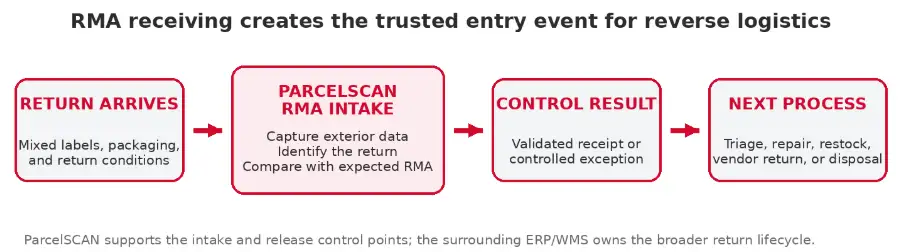
RMA automation within reverse logistics
Reverse logistics can include return authorization, transportation, receiving, inspection, testing, repair, refurbishment, restock, vendor return, resale, recycling, disposal, customer credit, and outbound shipment. ParcelSCAN should not be positioned as the system that manages this complete lifecycle.
Its strongest role is narrower and operationally critical: create a reliable digital record when the return enters the facility and, when required, verify the parcel again when it leaves a controlled process. This gives the broader reverse-logistics workflow a trustworthy physical-to-digital handoff without moving customer-specific lifecycle logic into the vision platform.
Condition and contents boundary
Exterior images can document packaging condition and visible damage. They do not prove the condition, quantity, serial number, or contents of a sealed package unless that information is externally visible, provided through a trusted association, or available from a proven RFID read.
What ParcelSCAN Contributes to RMA Processing
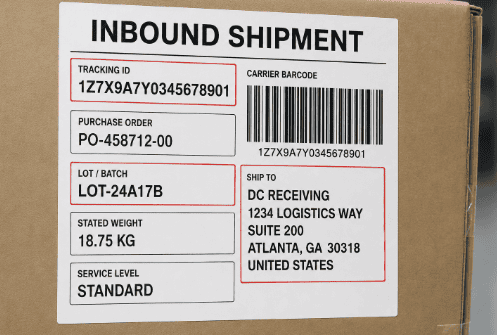
Selecting the right identifier
Rules may vary by customer, product family, service program, and return channel. They should define which field is authoritative, how carrier or customer identifiers map to internal records, which values must be unique, and what evidence is required before the parcel can be posted automatically.
For example, a carrier tracking number may locate the shipment record while the RMA number identifies the return transaction and a serial number identifies the asset. ParcelSCAN can collect these visible values as one event; the integrated workflow determines which relationships must be confirmed.
Integration and ownership boundaries
| Scope boundary | Production meaning |
| ParcelSCAN can validate | Exterior RMA and carrier labels; visible barcodes and text; configured identifier relationships; parcel dimensions; optional RFID reads; receipt and release evidence. |
| Surrounding systems typically own | RMA creation and eligibility; refund or credit logic; disposition authorization; repair workflow; inventory status; customer communication; financial posting. |
| A controlled exception is still required when | The necessary serial, quantity, part, ownership, or condition information is inside a sealed carton and no trusted external or RFID association exists. |
Exception handling is part of the RMA workflow
| Exception | Controlled response |
| No readable return identifier | Retain the parcel images, retry configured views, or route to review without assigning an uncertain RMA. |
| Multiple candidate identifiers | Apply label-of-interest rules; if ambiguity remains, present candidates and hold the event for confirmation. |
| RMA not found or closed | Keep the parcel in an unmatched queue and follow the customer-specific unauthorized-return process. |
| Item or serial not expected | Prevent automatic posting and direct the parcel to the defined wrong-item or ownership review. |
| Repeated unique identifier | Flag the second receipt when an RMA, serial, tracking, or asset identifier should occur only once. |
| Required exterior field missing | Hold the event for a supplemental lookup, relabel, or controlled open-carton process. |
| Visible package damage | Preserve exterior evidence and route to the customer-defined inspection process; do not infer internal condition. |
| System or interface unavailable | Queue the parcel event with its evidence and prevent unconfirmed posting until recovery rules are satisfied. |
Accelerating High-Value Check-In and Check-Out
RFID is not required for most RMA workflows. Exterior vision remains the baseline because every parcel can present a visible label while only selected networks have a reliable RFID tag standard and item association. RFID becomes valuable when a high-value asset is already tagged and the same identifier is trusted across the customer, service, repair, and return network.
In that environment, a configured read can reduce the repeated manual process of finding and scanning a serial or asset label at each handoff. The RFID value can be reconciled with the visible parcel identity and expected RMA during receiving, then checked again when the asset or parcel leaves repair, staging, or shipping.
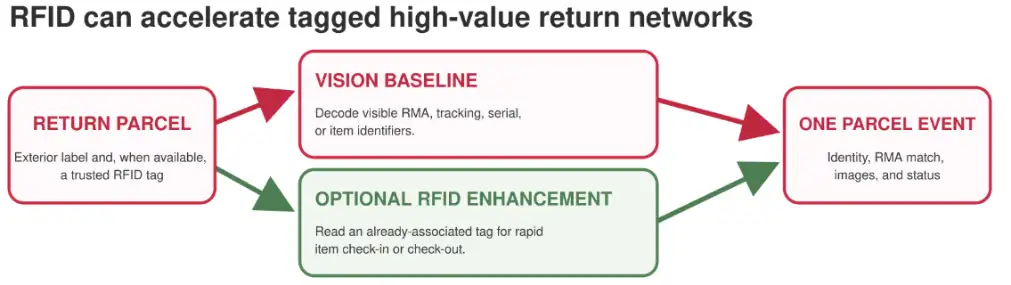
What must be proven for RFID
RFID strengthens an association; it does not create one
A fast read is useful only when the tag-to-item mapping and transaction relationship are trusted. Otherwise, RFID can accelerate the wrong decision just as easily as a misapplied barcode.
Proving the RMA Rules Before Scaling Volume
A production test should include representative customers, product families, label templates, package sizes, multiple-label cases, worn labels, closed and expired RMAs, duplicate parcels, unexpected serials, and the open-carton exceptions that remain outside exterior automation. RFID testing should be a separate workstream using the final tags, products, packaging, spacing, and reader geometry.
Rules to define before production
Expected operational value
RMA processing is a natural ParcelSCAN application because it begins with a recurring physical-to-digital control problem: determine what arrived, connect it to the correct expected return, and preserve enough evidence to move it forward confidently. That validated intake event can support the broader reverse-logistics process without claiming ownership of inspection, disposition, repair, credit, or inventory logic.
ParcelSCAN provides the exterior imaging, data capture, label selection, comparison-ready event, and exception record needed to make RMA receiving repeatable. RFID can extend that workflow for tagged high-value assets, but only where item association, tag performance, packaging, and read-zone control have been proven.
Q1. What does ParcelSCAN automate in an RMA process?
ParcelSCAN captures configured exterior parcel faces, decodes visible barcode and text fields, selects the relevant identifier, and creates a parcel event that can be compared with the expected RMA or asset record. It also preserves images, selected data, match status, dimensions, and exceptions for traceability.
Q2. Does ParcelSCAN manage the complete reverse-logistics lifecycle?
No. It supports the physical intake and, when configured, release validation points. The surrounding return-management, ERP, WMS, service, or repair systems normally own authorization, disposition, inspection, inventory status, credit, customer communication, and financial posting.
Q3. Can ParcelSCAN validate a sealed returned item?
It can validate the exterior label and any trusted data associated with that parcel. If the required item, serial, quantity, ownership, or condition information exists only inside the carton, the operation still needs an open-carton inspection or another trusted association such as a proven RFID tag.
Q4. When does RFID improve RMA receiving?
RFID is most useful when higher-value items are already tagged, the tag is uniquely mapped to the asset, and the identifier is trusted across the return network. It can accelerate repeated check-in and check-out while visible labels and images provide parcel context and evidence.
Q5. Can RFID read through every return package?
No. Read performance depends on tag type and placement, item materials, packaging, orientation, distance, nearby tags, and reader geometry. Metal and metallized ESD packaging can be especially challenging, so the production tag and package combinations must be tested.
warehouse insider
Sustaining reliable six-sided capture, routing decisions, and exception control at production conveyor speed.
The core challenge
High-volume parcel networks must identify and route a wide range of packages without slowing the conveyor. At thousands of parcels per hour, even a small no-read, false-match, or late-decision rate can create a large manual exception burden and send errors downstream.
Parcel sortation environments combine high throughput with extreme variation. Boxes, polybags, padded mailers, tubes, and irregular packages may enter the same line with labels placed on any surface, printed at different quality levels, or surrounded by unrelated barcodes and markings. The automation must maintain parcel identity from induction through the sorter while the decision window continues to shrink with line speed.
Vimaan’s ParcelSCAN creates a tracked digital event for each parcel, captures configured exterior faces, extracts the relevant barcode or text, and delivers the data needed to make a route decision. When labels may appear on the face resting on the conveyor, the production design can add an engineered transfer and underside imaging station so the bottom surface becomes visible without breaking parcel association.
What This Application Addresses
Why Scan Rate Alone Does Not Prove Sortation Performance
A high-speed tunnel can acquire many images, but the operation succeeds only when the correct parcel identity is available early enough to execute the correct divert. Three linked conditions determine that outcome.
Three linked failure points
1. The decisive label may be on any face.
Top and side coverage can still miss the only useful identifier when it is face down. If the process cannot control label placement upstream, complete coverage requires a deliberate method for exposing and imaging the underside.
2. A decoded value must remain attached to the correct parcel.
Closely spaced or unstable parcels can create trigger errors, merged events, or data-to-package mismatches. Gapping, sensing, position tracking, and transfer behavior must work as one system, especially when capture occurs at multiple physical points.
3. The decision must arrive before the sorter needs it.
Image acquisition is only the first step. Decoding, label selection, record lookup, route assignment, communication, and the physical divert all consume time. The architecture must be validated against the shortest production decision window at peak load.
Throughput means parcels correctly routed
The useful rate is not images captured or codes attempted. It is the sustained number of parcels correctly identified, assigned, and physically delivered to the intended destination with exceptions kept under operational control.
Common operational consequences
One Parcel Event from Induction Through Divert
The operating sequence must preserve identity across cameras, conveyor transfers, software decisions, and sorter actions. Ownership varies by deployment, but the handoffs and timing budget should be explicit before production.
| Step | Control | What happens |
| 1 | Singulate | Maintain defined parcel gaps and stable presentation at lane speed. |
| 2 | Track | Create one parcel event and preserve its position through every capture point. |
| 3 | Capture | Image the top, four vertical faces, and the exposed underside. |
| 4 | Identify | Decode configured 1D/2D codes and text; select the label of interest. |
| 5 | Normalize | Convert the selected identity into the format used by the routing system. |
| 6 | Decide | Match the parcel to a route while it remains inside the sorter decision window. |
| 7 | Act | Commit the destination or divert an uncertain event to a controlled exception path. |
| 8 | Record | Retain images, extracted data, route result, timing, and exception history. |
Engineering the sixth face
Top and four vertical surfaces can be captured around a conventional tunnel. The face resting on the belt requires a different mechanical view. A production six-sided configuration typically uses an engineered transfer – such as a split, narrow-belt, or other suitable conveyor arrangement – that briefly exposes the underside to dedicated cameras and lighting while the control system continues to track the parcel.
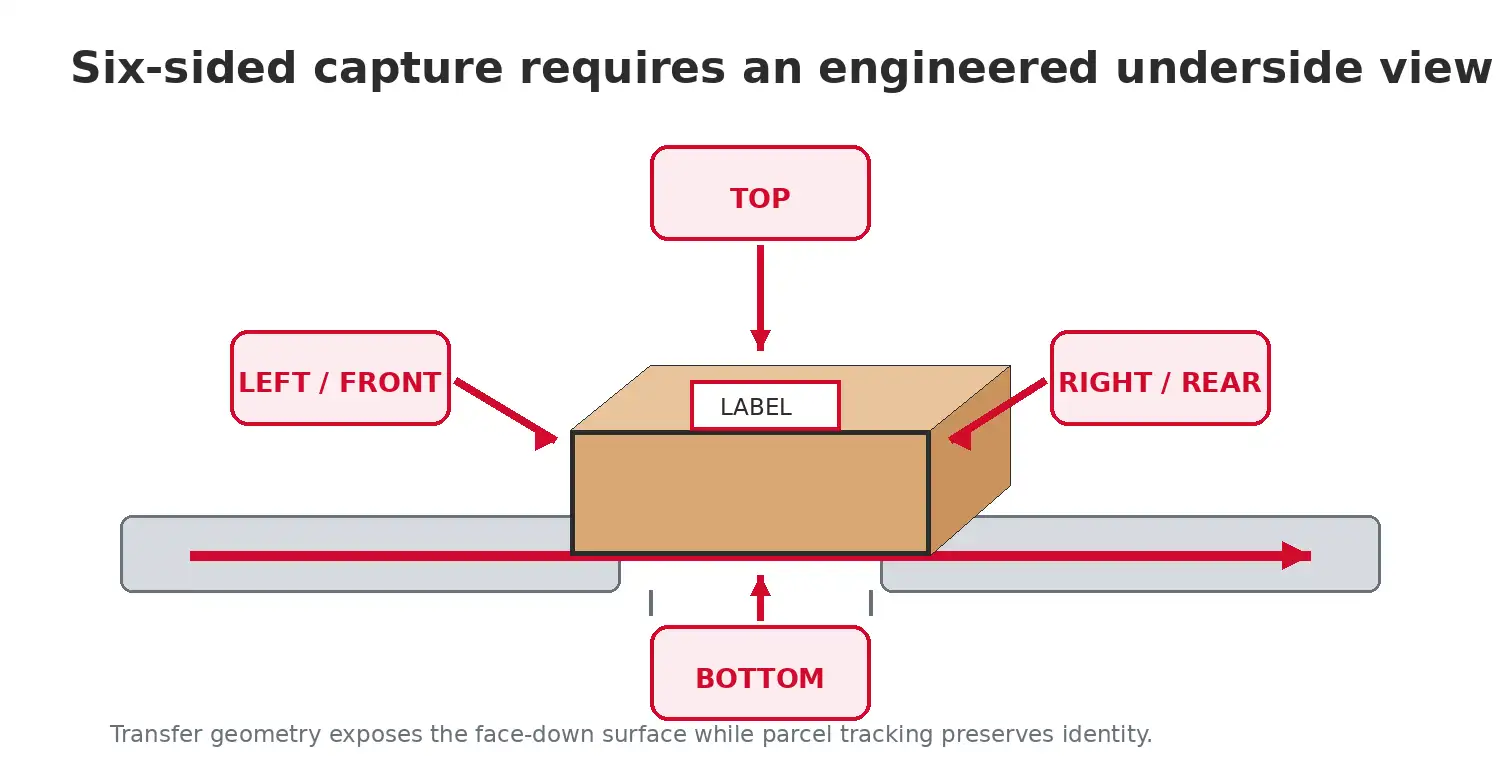
Application-specific conveyor design
The transfer and camera arrangement must be selected for the actual parcel size and weight range, package stability, required gap, belt speed, available footprint, and maintenance access. Six-sided coverage is an engineered production configuration, not a camera-only add-on.
What ParcelSCAN Contributes at High Speed
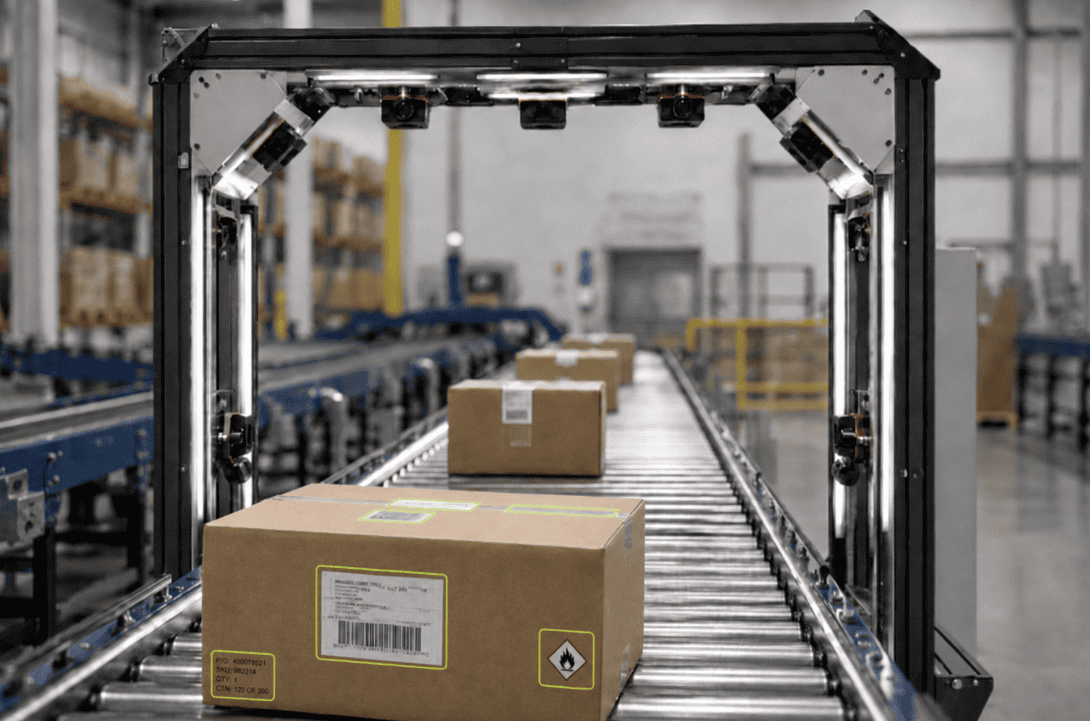
From capture to route commitment
The identity pipeline may decode several candidates from multiple views. Configured rules select and normalize the intended field, after which the parcel is matched to a route record. The result must include a definitive destination or a defined exception state; an uncertain match should never be converted silently into an automatic sort decision.

Integration and ownership boundaries
ParcelSCAN can provide the vision, decoding, label-selection, and parcel-event layer. The WCS, WES, warehouse application, PLC, sorter controller, or integrator may own route lookup, conveyor tracking, divert commands, physical sorter execution, recirculation, and lane-full logic.
The integrated design should document ownership and define parcel IDs, position signals, route messages, acknowledgements, timeouts, fail-safe destinations, clock alignment, retry rules, and the treatment of late or duplicate messages.
Exception handling is part of line capacity
| Exception | Controlled response |
| No readable routing identifier | Use the available views and configured retry logic; otherwise divert without inventing an identity. |
| Multiple plausible identifiers | Apply label-of-interest rules and confidence thresholds; hold unresolved events for review. |
| No route match | Send the parcel to the defined unmatched path and retain its images and candidate data. |
| Merged or ungapped parcels | Block the combined event from automatic routing and recirculate or separate the parcels. |
| Underside not exposed | Treat six-sided coverage as incomplete; route according to the configured retry or manual process. |
| Parcel is Damaged | Automatically or manually divert package to hospital |
| Parcel is Oversized | Automatically or manually route those parcels separately |
| Parcel unstable at transfer | Protect parcel tracking, stop or divert if required, and classify the mechanical cause for correction. |
| Late decision or communication failure | Use the predetermined fail-safe route rather than allowing an unconfirmed divert. |
| Divert confirmation failure | Record the control fault and reconcile the physical parcel before returning it to the automated stream. |
| Recirculation limit reached | Move the parcel to staffed resolution so it cannot consume line capacity indefinitely. |
Exception capacity must scale with peak volume
A low percentage can still represent hundreds of parcels during a peak period. The exception spur, recirculation loop, accumulation, staffing, and resolution tools must be sized as part of the production system, not added after commissioning.
Proving the Complete Operating Envelope
Commissioning should progress from capture observation to shadow route decisions and then controlled automatic diversion. The test set should represent the production parcel mix rather than ideal cartons: smallest and largest packages, dark and reflective materials, polybags, worn labels, labels near edges or seams, multiple codes, skewed presentation, tight legal gaps, and peak arrival patterns.
Design inputs to establish before detailed engineering
Production acceptance metrics
A common ParcelSCAN hardware configuration can support multiple workflows when parcel size, speed, capture coverage, and scheduling are compatible. Dedicated receiving and shipping lanes may still be preferred for concurrency, redundancy, or different peripheral equipment. These are operational design choices rather than separate vision platforms.
| Production metric | What it proves |
| Sustained throughput | Parcels processed per hour across representative volume and package mix. |
| Correct identification rate | Parcels assigned to the intended identity without manual correction. |
| Correct route rate | Parcels delivered to the intended destination, including sorter execution. |
| No-read / ambiguity rate | Events requiring retry, recirculation, or operator resolution. |
| Decision latency | Time from parcel trigger to route commitment at peak processing load. |
| Manual touches | Operator interventions per 1,000 parcels, classified by cause. |
Expected operational value
Very high-volume sortation is an end-to-end control problem. The operation must see the relevant label, preserve the physical parcel association, select the right identity, obtain a route, and execute the divert before the decision window closes. Weakness at any point turns speed into recirculation, manual handling, or missorts.
ParcelSCAN provides the multi-camera capture, data extraction, label-selection, and traceability layer for this workflow. When it is combined with engineered six-sided conveyor coverage, reliable tracking, defined integration ownership, and production-scale exception handling, high parcel volume can be processed with the efficiency and accuracy the network requires.
Q1. Why would an operation require six-sided parcel scanning?
Six-sided coverage is appropriate when the authoritative label may appear on any exterior face and upstream label orientation cannot be controlled. Capturing only the top and sides leaves a known blind surface that can become a material source of no-reads at high volume.
Q2. How is the bottom of a parcel scanned?
The conveyor must expose the face-down surface at an engineered transfer while dedicated cameras and lighting image it. The control system preserves the parcel event across that transfer. The exact mechanism depends on package range, speed, stability, gap, footprint, and service requirements.
Q3. Can ParcelSCAN operate at very high conveyor speed?
The system is designed for in-motion parcel capture, but production performance must be engineered and validated for the complete operating envelope. Required coverage, parcel dimensions, gap, belt speed, label quality, computing load, route-interface timing, and sorter distance all affect the sustainable end-to-end rate.
Q4. How does the system handle multiple or inconsistent labels?
ParcelSCAN can decode configured barcode types and extract text from the available views. Deployment-specific label-of-interest rules then select the routing field based on location, format, content, reference data, and confidence. Ambiguous results can be diverted instead of forcing an uncertain decision.
Q5. How does ParcelSCAN connect to sortation equipment?
ParcelSCAN exchanges the agreed parcel identity and event data with the surrounding WCS, WES, warehouse platform, PLC, sorter controller, or integration layer. The project must define who owns parcel tracking, route lookup, divert commands, acknowledgements, timeouts, fail-safe behavior, and confirmation of the physical result.
Q6. What happens when a parcel cannot be identified in time?
The event should be assigned to a predetermined exception or recirculation path rather than an assumed route. Images, decoded candidates, confidence, timing, and reason codes remain available for automated retry or operator resolution. Recirculation limits prevent repeated exceptions from consuming line capacity indefinitely.
warehouse insider
Creating an accurate parcel-level record while validating diverse items against the expected order, shipment, or return
The core challenge
Mixed-SKU flows combine unlike parcels, inconsistent labels, and multiple item identities in one processing stream. If each parcel cannot be correctly identified, normalized, and compared with the expected transaction, higher speed simply moves errors downstream faster.
Distribution, repair, returns, freight, and fulfillment operations routinely process mixed streams of parcels. Items may arrive floor-loaded, be destacked from mixed pallets, or be assembled from multiple storage areas for outbound shipment. Package size, product family, label format, and the identifier used by the business can differ from one parcel to the next.
Vimaan’s ParcelSCAN digitizes each parcel as an individual event, extracts configured identifiers and visible attributes, and compares the resulting record with an expected order, shipment, ASN, manifest, or RMA. The operation gains a running view of what has been processed, what remains outstanding, and which parcels require review – with images and data retained for traceability.
What This Application Addresses
Why Individual Scans Do Not Automatically Prove a Complete Transaction
A mixed-SKU workflow is not simply a faster version of single-barcode scanning. The operation must identify unlike parcels, interpret different external and internal labels, preserve each physical parcel’s identity, and reconcile the complete stream against a shared business record.
Three linked failure points
1. Parcel identity is not standardized.
One parcel may be represented by a carrier tracking number, another by an RMA, supplier carton ID, product number, OEM serial, or internal label. Multiple labels may remain from earlier life cycles, and the correct field may appear on any visible face.
2. A series of successful reads is not the same as a validated order.
The workflow must determine whether every expected parcel or item has been processed, whether an unexpected item entered the stream, and whether a unique parcel was scanned twice. These decisions require transaction context, not isolated reads.
3. Added process steps can break the parcel association.
Dimensions, weight, RFID, label printing, verification, and routing are valuable only when their outputs remain bound to the correct physical parcel event. Poor triggering or tracking can combine valid data from different parcels.
A readable barcode is not the final business outcome
The real control point is a defensible association among the physical parcel, the selected identity, the expected transaction, any measurements or labels created, and the final disposition.
Common operational consequences
From Unlike Parcels to One Reconciled Processing Record
ParcelSCAN supports a controlled workflow in which each parcel is captured once, translated into a common event record, and compared with the active business transaction. Exact ownership varies by deployment: ParcelSCAN may provide images, barcode and OCR outputs, label location, dimensions, and verification results while a WMS, ERP, WES, or integrator owns order logic, label creation, conveyor control, and posting.
| Step | Control | What happens |
| 1 | Load | Open the expected order, shipment, ASN, manifest, or RMA record. |
| 2 | Induct | Present parcels individually from a trailer, pallet, cart, or process lane. |
| 3 | Capture | Image visible faces and collect configured barcode, OCR, RFID, logo / symbol, dimension, or weight data. |
| 4 | Identify | Select the authoritative parcel or item identifier using defined rules. |
| 5 | Normalize | Translate varied supplier, carrier, or internal fields into a common validation record. |
| 6 | Compare | Reconcile each parcel event with the expected transaction and running totals. |
| 7 | Resolve | Hold unreadable, ambiguous, unexpected, or duplicate events for controlled review. |
| 8 | Release | Post validated results, route the parcel, and preserve the image and data record. |
The comparison rules matter as much as the capture
Rules may vary by supplier, carrier, item family, customer, or process. They define which field is authoritative, how external identifiers map to internal records, whether a value is expected to be unique, and when the transaction is considered complete. Repeated SKU values should not be treated as duplicates unless a unique parcel or serial identifier is also present; otherwise, the process must evaluate parcel events and expected quantities together.
What ParcelSCAN Contributes to Mixed-SKU Processing
Building a Common Validation Record from Unlike Parcels
ParcelSCAN can capture the visible information available on each package, even when that information is not presented in a common label template. A receiving parcel may be identified by an RMA or supplier reference; an outbound parcel may require an internal tracking number, item identifier, dimensions, weight, and carrier label. The configured workflow converts those different inputs into a consistent parcel event.
Two capabilities make the mixed-SKU process usable at transaction level:
This allows one station to process different parcel identities without forcing every supplier, carrier, or product family into the same external label design. The rules still need to be explicit: automation should hold an event whenever identity, expected quantity, or match confidence is uncertain.
Integration and ownership boundaries
The solution can exchange data through APIs, messages, or file-based interfaces depending on the surrounding architecture. Before deployment, ownership should be defined for transaction selection, parcel triggering and tracking, identifier rules, expected-record lookup, comparison logic, measurement devices, label generation, routing, exception resolution, and final posting.
ParcelSCAN can operate as the parcel digitization and validation layer while the warehouse platform or system integrator retains business transactions and material-handling control. This keeps customer-specific order and disposition rules in the systems best equipped to manage them.
Exception handling is part of the production workflow
| Exception | Controlled response |
| No readable identifier | Retain the parcel images, retry alternate views, or route to operator review without assigning an uncertain identity. |
| Multiple candidate identifiers | Apply label-of-interest rules; if ambiguity remains, present the candidates and hold the event for confirmation. |
| No expected-record match | Keep the parcel in an unmatched queue and prevent automatic posting to the active transaction. |
| Unexpected parcel or item | Record the event separately and route it according to the customer’s overage, wrong-item, or unknown-item process. |
| Repeated unique identifier | Block or flag the second event when a parcel, serial, or tracking identifier is expected to occur only once. |
| Expected item still missing | Keep the transaction open or require authorized closure with a documented shortage or exception reason. |
| Measurement or peripheral failure | Preserve the parcel association and divert for remeasurement, relabeling, or controlled manual completion. |
| Verification or routing failure | Do not release the parcel automatically until the expected label, output, or destination is confirmed. |
Visible-data and association boundary
ParcelSCAN validates exterior information and data associated with the parcel event. If required part, serial, country-of-origin, or quantity information is sealed inside a carton, it must be exposed through an external label, a trusted upstream association, an RFID read, or a defined open-carton exception.
Configuring the Same Core Platform for Different Process Flows
Inbound receiving and returns
Parcels can be unloaded from a floor-loaded trailer or destacked from mixed pallets, presented individually, and reconciled with an expected receipt or RMA. The workflow may add an internal tracking label, RFID association, destination assignment, or operator-directed exception step before putaway or repair processing.
Outbound order and shipping validation
Picked or repaired units can be processed against an active order, with configured identifiers, dimensions, and in-line weight captured before the carrier label is generated or verified. The order remains open until required items are accounted for or an authorized exception closes it.
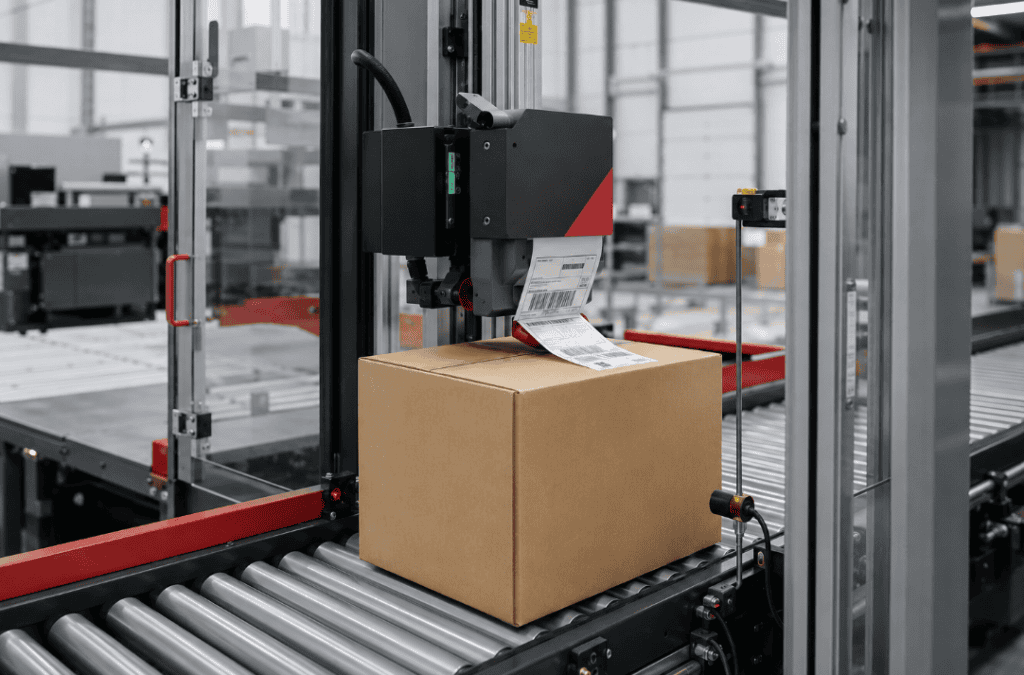
Shared or dedicated stations
A common ParcelSCAN hardware configuration can support multiple workflows when parcel size, speed, capture coverage, and scheduling are compatible. Dedicated receiving and shipping lanes may still be preferred for concurrency, redundancy, or different peripheral equipment. These are operational design choices rather than separate vision platforms.
Rules to define before production
Expected operational value
Mixed-SKU parcel processing is not solved by reading more barcodes alone. The operation must turn unlike packages and labels into consistent parcel events, associate each event with the correct business transaction, and determine when the complete order, shipment, or return is valid.
ParcelSCAN provides the imaging, data capture, and validation layer needed to make that process repeatable. Combined with explicit identifier rules, reliable parcel tracking, and clear system ownership, it allows high-volume mixed-SKU flows to move faster without sacrificing control or traceability.
Q1. What does mixed-SKU parcel processing mean?
It is the processing of a parcel stream containing different products, packaging formats, label designs, and identifier types. The parcels may belong to one order or return batch, or may represent several transactions moving through a shared station. The system must identify each parcel correctly while maintaining the appropriate transaction context.
Q2. How is this different from standard barcode scanning??
A standard scanner returns the code it sees. Mixed-SKU validation must determine which visible code matters, map different formats into a common record, compare each parcel with expected data, maintain running completion status, and control exceptions. The result is a validated transaction rather than a list of reads.
Q3. Can ParcelSCAN handle multiple labels on the same package?
Yes. ParcelSCAN captures visible barcodes and text from configured parcel faces, then applies deployment-specific rules to identify the relevant label or field. If more than one candidate remains plausible, the event can be held for operator confirmation instead of forcing an uncertain match.
Q4. How does ParcelSCAN compare parcels with a WMS or ERP order?
The surrounding system supplies or exposes the expected order, shipment, ASN, manifest, or RMA data. ParcelSCAN returns the configured identity and parcel-event data for comparison, or participates in an integrated workflow where running match status is presented in ViewDECK or the customer system. Exact ownership of lookup, comparison, and posting is defined during integration.
Q5. Can the system detect missing, unexpected, or duplicate parcels?
Yes, when the expected transaction and identifier rules provide enough information. Unexpected items can be flagged when they do not match the active record. Missing items are identified when expected quantities or unique records remain unfulfilled at transaction close. Duplicate detection requires an identifier expected to occur only once; repeated SKU values alone may represent legitimate quantities.
Q6. Does ParcelSCAN eliminate the need to open every carton?
ParcelSCAN can validate exterior labels and associated data. A carton may remain closed when required part, serial, quantity, or country-of-origin information is available on the exterior, through a trusted upstream association, or through a readable RFID tag. If essential data exists only inside the carton, the process still needs an open-carton or other controlled exception.
warehouse insider
Creating a reliable link between the physical parcel, the correct receiving record, and the internal label used downstream
The core challenge
External carrier and supplier labels are not a common warehouse identity. If an operation cannot determine what arrived, match it to the right business record, and apply the right internal label to the same physical parcel, downstream automation begins with unreliable data.
Many operations – from large-scale distribution centers, to public institutions, to small-scale manufacturers – receive parcels from multiple suppliers, carriers, and channels. The parcel may arrive with a carrier tracking number, supplier barcode, purchase-order reference, packing label, or several labels accumulated across earlier handling steps. None may be the standardized identifier the receiving operation needs for check-in, sortation, ownership, putaway, fulfillment, or audit. Without a specially-trained Operator to know the difference, the process becomes slow and prone to error.
Vimaan’s ParcelSCAN digitizes the visible parcel, extracts candidate identifiers, applies business rules to select the correct label of interest, and provides the data needed to match the parcel to the appropriate warehouse record. Once the correct internal identity is generated, the label can be applied manually or through print-and-apply automation, with verification and exception controls protecting the parcel-to-record association.
What This Application Addresses
Why the Absence of a Common Label Creates Friction
A common internal label gives the warehouse one dependable identity for every parcel. Without it, operators must interpret whatever labels happen to be present, decide which number matters, search one or more systems, create or select a receiving record, and then make sure the newly printed label goes onto the correct parcel.
Each task is manageable in isolation. At receiving-line speed, however, the combination creates delay and multiple opportunities for error.
Three linked failure points
1. Identification is slow and inconsistent.
Different suppliers and carriers use different formats. Labels may be placed on any visible face, folded over an edge, partially damaged, or surrounded by unrelated barcodes. Operators must know which field to use and may have to rotate or rescan the parcel.
2. A successful read is not the same as a correct match.
Reading a barcode only proves that a code was detected. The operation must still determine whether it is the carrier tracking number, supplier carton ID, PO reference, product identifier, or another code—and whether that value maps to exactly one valid receiving record.
3. Label application can break the chain of identity.
Even when the correct internal label has been generated, it can be applied to the wrong parcel, placed where it cannot be read downstream, duplicated, or released before application is confirmed. Both manual and automated application require explicit rules.
A read is only valuable when it drives the correct transaction
The business outcome is not simply barcode capture. It is a controlled association among the physical parcel, the selected external identifier, the correct system record, and the newly assigned internal label.
Common operational consequences
From External Labels to a Verified Warehouse Identity
Vimaan’s ParcelSCAN supports a stepwise receiving workflow in which each decision is validated before the parcel is released. The exact system boundaries vary by deployment: ParcelSCAN may supply image, OCR, barcode, and label-location data while a WMS, WES, ERP, or integrator performs database lookup, label generation, conveyor control, and print-and-apply logic.
| Step | Control | What happens |
| 1 | Capture | Image visible parcel faces and read candidate labels |
| 2 | Identify | Select the identifier of interest using defined rules |
| 3 | Match | Query receiving data for the correct business record |
| 4 | Create | Generate or retrieve the required internal identifier |
| 5 | Apply | Release the print job and bind it to the parcel event |
| 6 | Verify | Confirm the expected label on the same physical parcel |
| 7 | Release | Continue the parcel or divert it to exception handling |
The Decision Rules Matter as Much as the Imaging
Rules may use carrier format, supplier profile, symbology, field length, label location, nearby text, shipment context, or a prioritized hierarchy. The first readable barcode is not automatically the correct one. A one-to-one match may proceed; zero-match or multi-match results should pause the transaction and prevent uncertain label generation.
What ParcelSCAN Contributes and How Exceptions are Handled
Comprehensive Data Capture and Intelligent Field Selection
ParcelSCAN does more than search for a single predetermined barcode. It records the full set of visible information on the parcel: including barcodes, printed text, addresses, shipping references, lot, batch or manufacturing codes, stated weight, and other relevant markings. Parcel dimensions can also be captured when they are required for the receiving or routing workflow.
Vimaan’s AI and machine-learning models then determine which information is relevant to the immediate business decision. This may mean identifying the correct unique parcel identifier from several visible labels, or evaluating a combination of fields when no single value is sufficient. For example, a workflow could compare the stated weight, lot or manufacturing code, destination address, and parcel dimensions against expected receiving data before determining the correct system record or routing destination.
This creates two distinct capabilities:
This is especially valuable when routing decisions depend on printed destination-address text rather than a standardized barcode. ParcelSCAN does more than search for a single predetermined barcode. It records the full set of visible information on the parcel: including barcodes, printed text, addresses, shipping references, lot, batch or manufacturing codes, stated weight, and other relevant markings. Parcel dimensions can also be captured when they are required for the receiving or routing workflow. can interpret that address information and use it to direct parcels to the appropriate delivery center or downstream workflow.
Integration and ownership boundaries
The solution can exchange data through APIs, messages, or file-based interfaces depending on the surrounding architecture. Before deployment, responsibilities should be explicit for trigger signals, parcel tracking, OCR and barcode outputs, database lookup, internal-ID generation, print-job creation, applicator control, verification, reject handling, and the final receiving transaction.
This separation allows ParcelSCAN to operate as the parcel digitization and validation layer while the warehouse platform or system integrator retains the business transaction and material-handling logic. It also avoids embedding customer-specific receiving rules in the wrong component.
Exception handling is part of the production workflow
| Exception | Controlled Response |
| No readable identifier | Retain images, retry using alternate views, or route to operator review without generating an internal label |
| Multiple candidate identifiers | Apply label-of-interest rules; if ambiguity remains, show candidates and hold the parcel for confirmation |
| No system match | Prevent automatic receipt and label creation; route to a defined unmatched-parcel queue |
| Multiple system matches | Block automatic assignment until the correct record is resolved. |
| Print/apply failure | Keep the parcel associated with the open transaction and divert it for reprint or manual application |
| Verification failure | Do not release the parcel until the expected label is detected or the event is resolved by an authorized operator |
Visible-data boundary
ParcelSCAN can validate information visible on the parcel exterior. If required item-level, serial, country-of-origin, or other data is sealed inside a carton, the process must expose that information through standardized external labeling, an upstream data association, or a defined open-carton exception.
Label Application Options and Operational Outcomes
All profiling events are automatically stored within ViewDECK, Vimaan’s web-based visualization and analytics platform.
Choosing the right label application approach
After ParcelSCAN identifies the parcel and generates the correct internal label, the label can be applied through either a fully automated or operator-assisted workflow.
Automatic print-and-apply offers the highest level of automation and is particularly valuable for high-volume, standardized conveyor operations. However, it requires specialized equipment, precise parcel tracking and placement rules, dimension measurements, controls integration, and additional engineering, making it the more expensive option to deploy. ParcelSCAN functions as the vision and parcel identify platform in a larger system, which can be managed by a Systems Integrator or In-house team.
Operator-assisted application provides a lower-cost alternative. ParcelSCAN prints the correct label and presents the corresponding parcel information and placement instructions through Vimaan’s user interface. An operator then confirms the parcel and manually applies the label. This approach still reduces identification and matching errors while requiring less equipment and integration, although it retains a manual step in the receiving process.
Rules to define before production
Expected operational value
Inbound internal labeling is not a printing problem alone. It is an identity-control process. The receiving operation must determine what the parcel is, match it to the correct business record, create the right warehouse identifier, and ensure that identifier is applied to and verified on the same physical parcel.
ParcelSCAN provides the imaging, data capture, and validation layer needed to make that chain reliable. Combined with well-defined business rules and clear system ownership, it replaces slow, inconsistent identification with a repeatable receiving workflow—and gives downstream automation a trustworthy parcel identity from the moment of receipt.
Q1. What is inbound internal labeling and why does it matter?
Pallet profiling is the process of capturing true 3D dimensions, geometry, and load condition of a pallet while it moves through a facility. For warehouses using automated conveyors, AS/RS, or AGVs, incoming pallets must meet strict physical requirements. A pallet that is over-height, leaning, or has overhang can cause conveyor jams, sorter misroutes, or AS/RS failures. Profiling at entry points prevents these problems before they propagate downstream.
Q2. Why can’t the operation just use the carrier or supplier label that arrives on the parcel?
Carrier and supplier labels serve the upstream transport chain, not the warehouse. A single parcel may arrive with a carrier tracking number, a supplier carton ID, a PO reference, a shipping label, and accumulated labels from earlier handling. None of these is guaranteed to be the identifier the warehouse needs for its own systems. Without translation to an internal label, every downstream system has to interpret external labels differently.
Q3. How does ParcelSCAN identify the correct label when multiple barcodes are present?
ParcelSCAN captures all visible barcodes, printed text, addresses, lot codes, and other markings on the parcel exterior. Deployment-specific business rules then determine which identifier is relevant for the immediate transaction, based on carrier format, supplier profile, symbology, field length, label position, or a prioritized hierarchy. The first readable barcode is not automatically selected; the rules govern which value is used for matching and label generation.
Q4. What happens when ParcelSCAN cannot find a match or finds multiple matches?
ParcelSCAN is designed to handle ambiguity explicitly rather than defaulting to an uncertain outcome. If no identifier is readable, the parcel is held for operator review without generating an internal label. If multiple candidates are found and rules cannot resolve them, the transaction pauses for confirmation. If no system record matches, automatic receipt and label creation are blocked. These controls prevent mislabeling from propagating downstream.
Q5. Does the operation need automated print-and-apply equipment to use ParcelSCAN?
No. ParcelSCAN supports both automated print-and-apply and operator-assisted label application. The automated path is suited to high-volume conveyor operations but requires additional equipment and integration. The operator-assisted path prints the correct label and presents placement instructions on-screen; an operator confirms and applies it manually. Both options benefit from ParcelSCAN’s identification and matching accuracy.
Q6. What is ViewDECK and how is it used in this workflow?
ViewDECK is Vimaan’s web-based visualization and analytics platform. In the inbound labeling workflow, it stores time-stamped parcel images, extracted data, match results, and exception history for every receiving event. Operators and managers can search historical records, investigate exceptions, and reconstruct the receiving chain for any parcel — supporting audits, claims, and process improvement.
warehouse insider
Vimaan develops AI-powered computer vision solutions that automate warehouse validation, inspection, and inventory workflows. Rather than replacing existing WMS, WCS, or automation systems, Vimaan provides real-time visual intelligence that helps customers verify inventory, shipments, pallet quality, and warehouse operations.
The PalletSCAN product family is designed to automate pallet validation across receiving, storage, production, and shipping workflows using a common software platform and analytics environment.
| Product | Primary Function |
| PalletSCAN 360 | Multi-sided pallet inspection and shipment verification |
| PalletSCAN 3D | Dimensioning, overhang, lean, Ti-Hi counting and SKU validation, and pallet profiling |
| PalletSCAN 100-D | Drive-by pallet face capture, LPN/SKU validation; quality checks |
This application note focuses on pallet profiling using PalletSCAN 3D, which is designed for inline dimensioning, lean detection and load integrity validation on conveyors and with AGVs/AMRs.
Modern warehouses and distribution centers increasingly rely on automated conveyors, automated guided vehicles (AGVs), sorters, and AS/RS systems to achieve high throughput and predictable performance. These systems assume that incoming pallets and parcels meet strict physical requirements, including correct dimensions, stable geometry, proper orientation, and acceptable load condition.
In reality, upstream variability introduces risk. Pallets or parcels may be over-height, skewed, leaning, partially collapsed, or unstable. When these items enter automated material handling systems unchecked, the result is often reduced throughput, unplanned stoppages, jams, or costly manual intervention.
To maintain the operational flow and automation gains, operators need a way to automatically profile items as they move through the facility, without slowing operations.
Pallet (and parcel) profiling goes beyond simple barcode identification. It creates a digital twin of each load while scanning in motion.
This includes:
This information can be evaluated in real time against system limits or stored for audit and analytics.
Material Handling systems are often already in-place. On conveyors, items are already constrained in speed, direction, and spacing; making them ideal candidates for automated inspection. Similarly, AGVs/AMRs make tightly controlled and predictable maneuvers.
Key drivers:
Preventing induction/handling failures (Ensuring loads meet robotic handling tolerances)
Rather than reacting to failures inside automation, conveyor and AGV-based profiling allows operations to shift left and detect problems at entry points.

Key capabilities include:
The system is designed to operate at typical conveyor speeds and spacing, supporting both average and peak throughput conditions.
Operational Outcomes

Customers deploying conveyor-based profiling typically see:
Most importantly, automation behaves as designed because the inputs are controlled.
Production-Tested Accuracies*
| Parameter | Accuracy |
| Depth Accuracy (<=0.5 in) | > 98% |
| Width Accuracy (<=0.5 in) | > 98% |
| Height Accuracy (<=0.5 in) | > 98% |
| Front / Back OverHang Accuracy (<=2.0 in) | > 98% |
| Left OverHang Accuracy (<=2.0 in) | > 98% |
| Right OverHang Accuracy (<=2.0 in) | > 98% |
*Accuracies can depend on speed of travel, shrinkwrap or other protrusions, etc.
All profiling events are automatically stored within ViewDECK, Vimaan’s web-based visualization and analytics platform.
Operators can:
By combining dimensional measurements with synchronized imagery, ViewDECK provides a permanent digital record of each inspected load, simplifying troubleshooting and customer claim resolution.
To see how PalletSCAN 3D can integrate with your conveyor or AGV setup and prevent automation failures at the source, Contact Us.
Q. What is pallet profiling and why does it matter for warehouse automation?
Pallet profiling is the process of capturing true 3D dimensions, geometry, and load condition of a pallet while it moves through a facility. For warehouses using automated conveyors, AS/RS, or AGVs, incoming pallets must meet strict physical requirements. A pallet that is over-height, leaning, or has overhang can cause conveyor jams, sorter misroutes, or AS/RS failures. Profiling at entry points prevents these problems before they propagate downstream.
Q. How does PalletSCAN 3D profile pallets without stopping the line?
PalletSCAN 3D uses computer vision and 3D reconstruction to profile pallets inline as they move at normal conveyor speeds. It does not require the pallet to stop or rotate. The system captures true 3D dimensions, detects lean and skew, identifies overhang, and generates pass/fail signals to the WMS, WCS, or PLC in real time.
Q. What does PalletSCAN 3D actually measure?
It captures length, width, and height with accuracy within 0.5 inches at over 98% reliability. It also measures volume, detects front/back and left/right overhang to within 2 inches, identifies lean and skew relative to gravity and the conveyor centerline, and flags asymmetrical or unstable load builds. Every scan is image-synchronized for traceability.
Q. Where in the workflow should pallet profiling happen?
Pallet profiling should happen at induction points wherever pallets enter an automated system. This includes conveyor induction from receiving docks, AS/RS entry points, and AGV/AMR handoff zones. The goal is to catch non-compliant pallets before they reach automated handling, not after a failure has already occurred.
Q. How are profiling results stored and reviewed?
All profiling events are automatically logged in ViewDECK, Vimaan’s web-based analytics platform. Operators can search historical profiles, review dimension data and images, investigate exceptions, and export records for audits or customer claim resolution. Data is available across facilities for trend analysis.
Q. Does pallet profiling work with AGVs and AMRs, not just conveyors?
Yes. AGVs and AMRs make tightly controlled, predictable movements, which makes them well-suited for automated profiling. PalletSCAN 3D can be configured to profile loads carried by AGVs and AMRs using the same gate-based approach used on conveyors.
warehouse insider
Discover how StorTRACK automates case counting on full and partial pallets using computer vision and depth mapping. Improve warehouse accuracy and reduce manual labor.
Distribution Centers (DCs) and warehouses often rely on a mix of traditional setups and evolving automation solutions. Most store inventory in rack systems as full pallets, with the bottom 1–2 levels used as “pick levels” for cases or partially picked pallets, while upper levels serve as “reserve locations.” Cycle counting these reserve locations is relatively simple — reading the Pallet ID (or LPN) and then verifying its location. Because full pallets typically contain a unique SKU and a known number of cases, the WMS can determine inventory totals and locations accurately.
However, over time, warehouse inventory accuracy issues still accumulate. It is common practice to conduct manual physical inventory processes, where operations shut down for manual reconciliation of on-hand inventory against WMS records.
While this setup works for conventional operations, it also reveals the inefficiencies of manual processes and highlights the need for automated cycle counting and pallet scanning solutions that improve scalability, accuracy, and efficiency.
In many DCs, picking occurs at all rack levels due to high SKU volume, making it impractical to limit access to just the lower racks. This is especially true in sectors like food distribution and automotive parts. When cases are picked from various levels, partial pallets result. These are harder to count since the remaining cases may be behind the pallet’s front-facing edge. The cycle counter must not only confirm the Pallet ID and location but also manually count the remaining cases, adding complexity and increasing the chance of error.
Automated cycle counting solutions help overcome these challenges by scanning and validating pallet content — even partial pallets — without requiring manual intervention. This reduces the manual physical inventory processes burden that plagues many warehouses with unnecessary labor costs and operational disruptions.
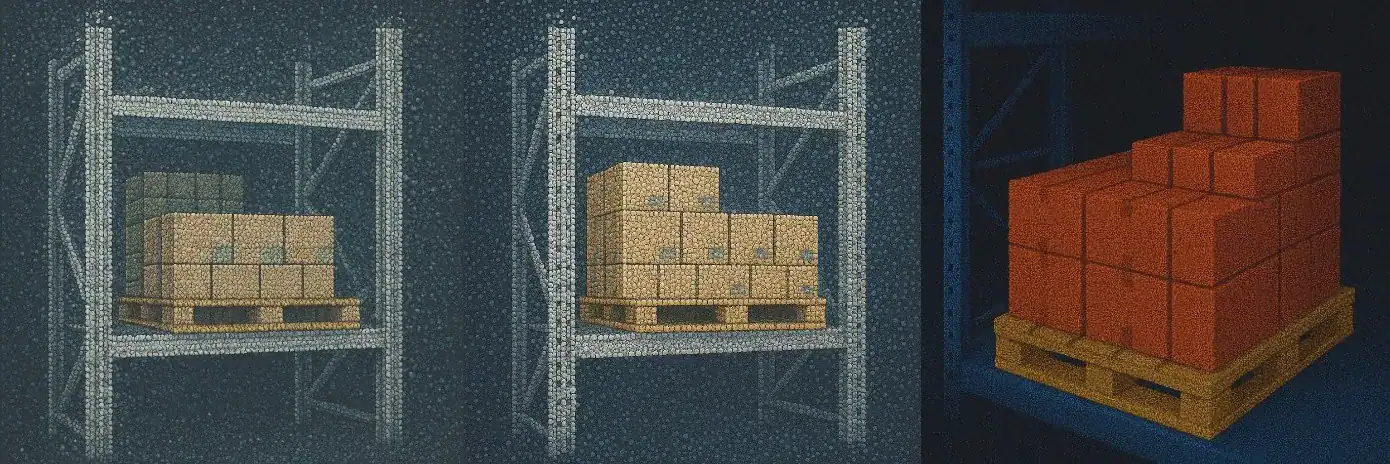
An example of a full pallet is shown Figure 1; different examples of partial pallets are shown in Figure 2.
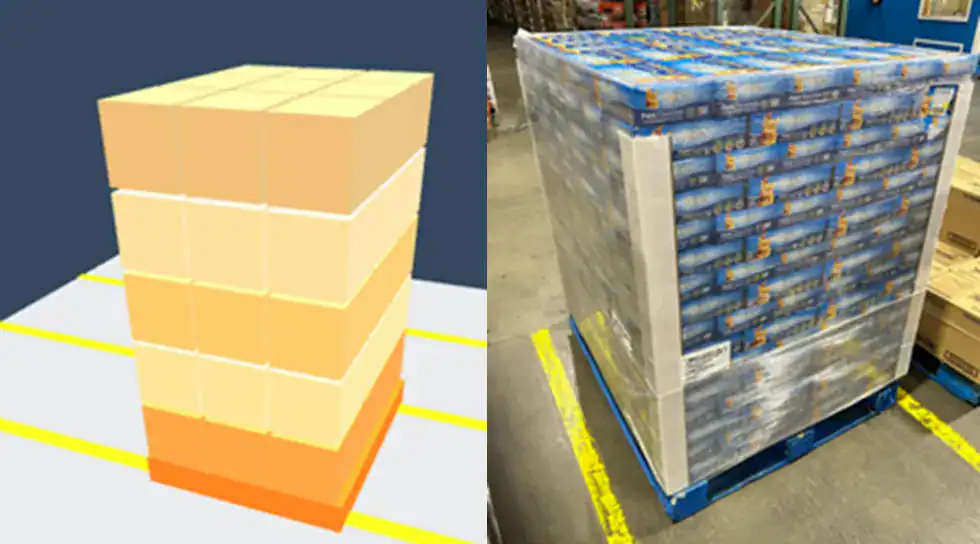
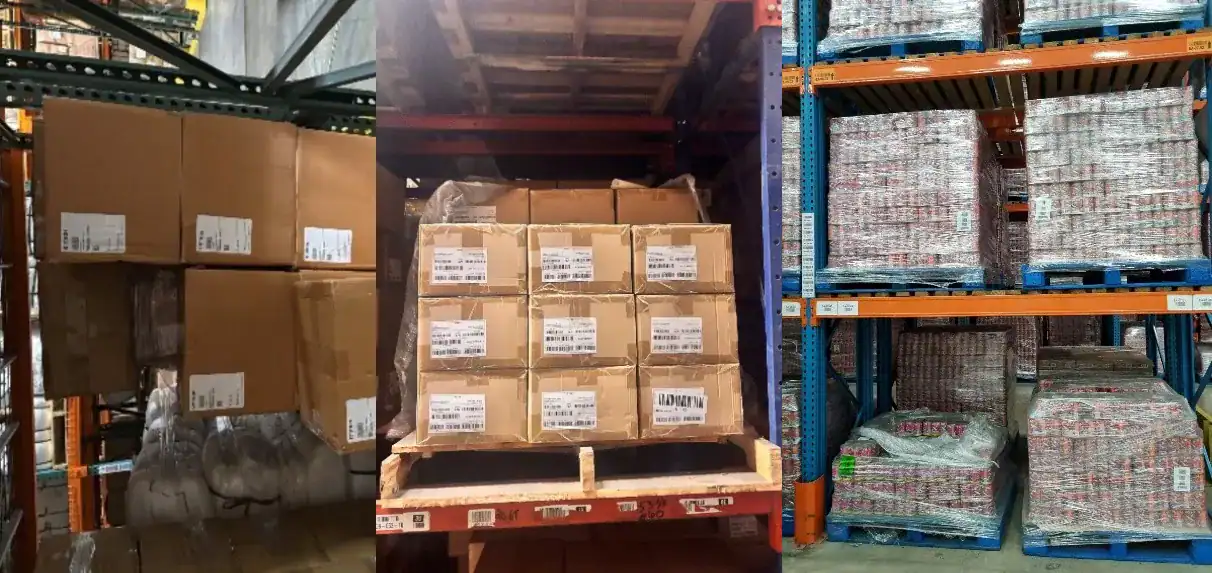
Automated cycle counting solutions are usually based on computer vision or barcode reading, both of which require visual line of sight to the items on the rack. Therefore, such solutions are only able to look at the “face” of a rack. Even in such situations, one can usually accurately infer the number of cases on a partially picked pallet – under certain assumptions as listed below.
1. The pallets should be stored single deep in the racks. Pallets that are hidden behind another pallet cannot be seen from the aisle.
2. The number of cases on the original full pallet should be known. This can come from the Ti-Hi structure of the pallet or from information contained in the WMS. It is not a requirement that the cases should be arranged in a Ti-Hi manner on the pallet.
3. All the cases on the pallet are assumed to be single SKU and of uniform dimensions.
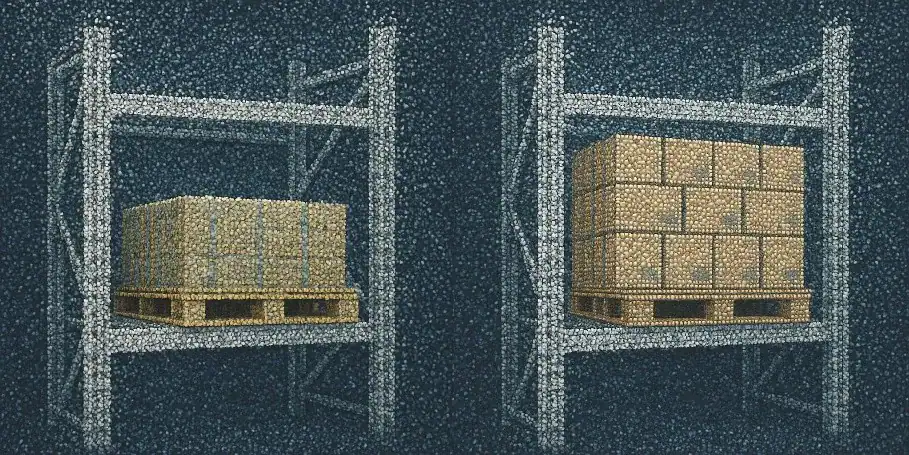
4. When the pallet is placed on the rack shelf and cases are picked from it, cases *should not* be picked from the “back” of the pallet. In other words, pickers should pick from the aisle, and every case picked should result in a visible “missing case” when viewed from the aisle. Examples of cases picked from the front and picked from the back are shown in Figure 3 and Figure 4.
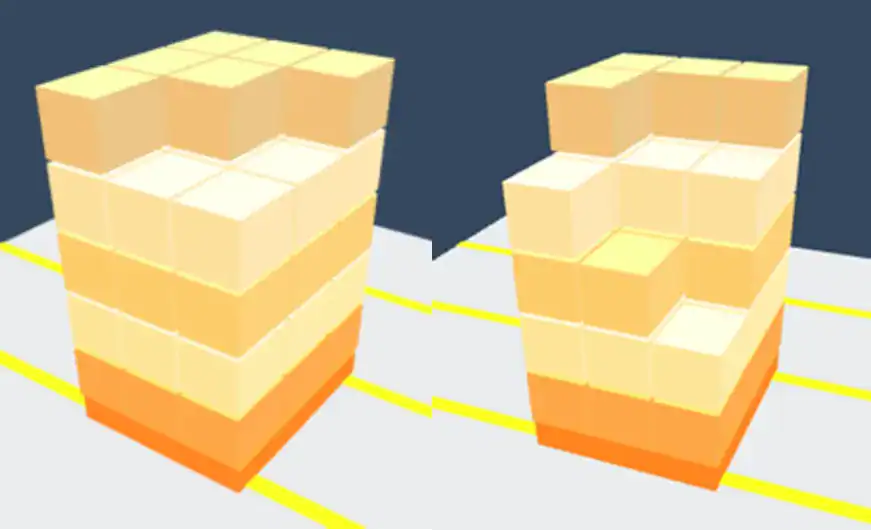

If these four key assumptions are met, Vimaan’s StorTRACK can infer the number of cases remaining in a partially picked pallet. The methodology used by the solution is as follows:
1. As StorTRACK moves parallel to the surface of the rack, it not only captures images of each pallet and case; it also creates a “depth map” that measures the distance from StorTRACK to the item being mapped. This generates a 3D point cloud which provides a high resolution map of every point on the inventory items with respect to the surface of the rack. If certain items are protruding from the surface of the rack, these can be measured; conversely, all points that are recessed from the rack surface are also accurately mapped.
2. The depth map generated by StorTRACK has dimensional fidelity, which means that it accurately measures the distance by which a certain point is either recessed or protruding from the surface of the shelf.
3. The depth map for a full pallet is therefore a plane which represents the front surface of the pallet. The dimensions of this plane represent the width and height of the front face of the pallet.
4. If a pallet is built in a Ti-Hi manner and an entire layer is picked from the pallet while it is on the shelf, the front surface will still be a plane with the same width as the original pallet, but with a height that is less than the height of the original pallet by the height of a single layer. In this manner, if entire layers are picked from a pallet, StorTRACK can use the planarity of the pallet and the width and height dimensions to determine how many layers have been picked. With this information, since StorTRACK also knows the original Ti-Hi structure and original number of cases on the pallet (Assumption #3), it can infer how many cases are still remaining on the pallet.
5. In a situation where a layer is partially picked, as long as cases are picked from the front, StorTRACK uses its depth map to first calculate how many layers are still complete (using Step 5 above). If a layer is incomplete, the depth map would vary across the width of the pallet. For example, if two cases have been picked from the top layer, then the depth of those two locations would increase by the depth of a case. Using this reconstruction, StorTRACK can accurately infer how many cases have been removed from any given layer. Since it also knows how many cases are on a given layer, it can also infer how many cases are remaining in that layer, and consequently, in that pallet.
Several examples of how the number of cases can change through picking and the resulting depth maps generated by StorTRACK are shown in Figure 5 and Figure 6.
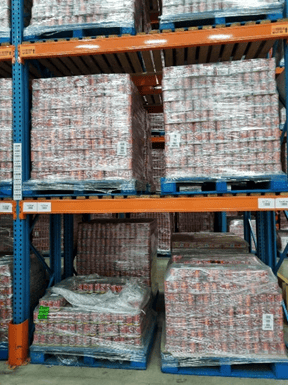
There are of course many real-life scenarios where a depth map cannot provide unambiguous case counts. For example, sometimes, pickers leave pallets partially shrink-wrapped, which results in uneven coverage of the pallet by shrink-wrap (see Figure 7 for example). Or they could disturb multiple other cases when they remove one case from the pallet. Sometimes, they don’t follow the Standard Operating Procedures and pick from the back. Other challenges may have nothing to do with picker behavior: If the case sizes are extremely small in relation to the pallet dimensions, errors in the depth maps or dimensional measurements may cause case counting or even layer counting errors. All these scenarios can generate irregular or unreliable depth maps.
In each of these scenarios, since StorTRACK automatically compares its inferred case count results against the WMS, it immediately highlights any discrepancy along with images of the location. In most cases, the image of the pallet can be viewed by the inventory clerk on a tablet or desktop and the number of layers and cases on the pallet can be counted manually just based on the image (if the assumptions hold true). In certain situations, it is not even possible to count the remaining cases on a pallet just from an image, and these specific locations will need to be verified by a cycle counter by physically visiting the bin location.
For a broader overview of the partial pallet counting problem and how computer vision solves it, read our blog post.
To learn how StorTRACK can work in your warehouse, Contact Us.
Q. What is a partial pallet and why is it harder to count than a full pallet?
A partial pallet results when cases are picked from a full pallet that’s still stored on a rack shelf, leaving behind a mix of full and empty positions. Unlike full pallets, which have a known SKU and a fixed case count verifiable via the WMS, partial pallets require a physical count of remaining cases which is a time-consuming, error-prone step that slows down cycle counting significantly.
Q. What assumptions need to be met for automated case counting to work on partial pallets?
Four conditions must hold: pallets must be stored single-deep so they’re visible from the aisle; the original full pallet case count must be known from the WMS or Ti-Hi structure; all cases on the pallet must be a single SKU and uniform in size; and pickers must pick from the front of the pallet, not the back. When cases are pulled from the back, the aisle-facing surface doesn’t reflect what’s been removed.
Q. How does StorTRACK count cases on a partial pallet?
As StorTRACK moves along the rack aisle, it captures both images and a depth map of each pallet, a 3D point cloud that measures how far each point protrudes or recedes from the rack surface. By comparing the depth profile of a partial pallet against the known dimensions of a full pallet, StorTRACK infers how many complete layers remain and how many cases have been removed from any partially picked layer.
Q. What happens when the depth map can’t give a clean count?
In scenarios with partial shrink-wrap, disturbed case stacking, or cases picked from the back, the depth map may be irregular or ambiguous. In these cases, StorTRACK automatically flags the discrepancy, surfaces an image of the location, and routes it for manual review – either a visual count from the image or a physical visit to the bin. The system never silently accepts an uncertain count.
Q. Does StorTRACK require pallets to be arranged in a Ti-Hi pattern?
No. While knowing the original Ti-Hi structure helps StorTRACK infer the total case count, the cases don’t need to remain arranged in Ti-Hi order on the pallet. StorTRACK uses the depth map geometry to reconstruct what’s present regardless of how cases are stacked, as long as the four core assumptions are met.
warehouse insider
Many Distribution Centers (DCs) and warehouses store inventory directly at the case level rather than as pallets. This is more common when a manufacturer or brand has thousands or even tens of thousands of SKUs in the DC, and items are being picked directly from every storage location. In such situations, cases (or cartons) are stored directly on shelves, with no pallets. There may also be a blurring of the boundaries between “locations” – each shelf is densely and fully packed with cases abutting each other to occupy every inch of space on the shelf.
High density case storage is often seen with fashion apparel, cosmetics, shoes, medical implants and other such products that by definition have a high number of SKUs to account for sizes, styles, colors, and seasons. Other products that use high density storage are irregularly shaped items such as rugs, furniture or home decoration products.
A generally common feature of high-density case storage is that the cases are stored single-deep. This is to usually enable pickers to more easily identify and locate the products during the pick process. It is also done to ease the process of cycle counting and inventory counting – multi-deep storage of cases at high density would make it extremely difficult to both locate as well as pick cases during order fulfilment. Examples of high-density case storage are shown in Figure 1.

While high density case storage offers advantages of increased warehouse space utilization, it is critical to maintain high accuracy of inventory location and know exactly where a given case with a given SKU is, so that pickers can know exactly where to go and be assured that the case/SKU that they are looking for is present in exactly the right location. Even small mis-placements of the cases – even if within the same shelf – can result in lost productivity if pickers have to spend their time searching the entire shelf for a particular case/SKU. Conversely, if a case is “misplaced” for whatever reason, it becomes very hard to locate that case because of the high density of storage and the sheer volume of cases in the facility. Given that these DCs typically store hundreds of thousands of cases at a given time and pick thousands of cases each day to fulfill orders, even a 99% accuracy is inadequate; target location accuracies for such warehouses often need to be upwards of 99.7% to maintain the flow of pickers and not delay shipments due to unlocatable inventory.
Achieving and maintaining such a high accuracy – especially at large DCs with high SKU count, high density, and high volume — can be a significant challenge. The traditional method is of course cycle counting – multiple cycle count associates are dedicated to the task of verifying the locations of various SKUs and cases on an everyday basis, and “cycling” through the DC or warehouse at a specified frequency, such as every month or every quarter. But given the nature of the products stored in these warehouses, the inventory also moves at a high “velocity” – which makes such infrequent cycle counting less useful. This of course poses the classic cycle counting cost vs. accuracy tradeoff: To maintain very high accuracy, the cycle count frequency needs to be very high (ideally 2-4 times per month), but the labor costs of such a high frequency cycle count pose an undue burden on the operation. An example of a densely packed location with multiple units of a SKU and multiple SKUs is shown in Figure 2.

Warehouse and DC Operations leaders are therefore naturally turning to automated solutions for cycle counting. There are three “classes” of automated cycle count solutions available in the market today. Below, we provide a synopsis of each approach and an analysis of why StorTRACK from Vimaan is an ideal solution for automated cycle counting of high density case storage.
● Drones automate the cycle counting process by flying from one location to another, using machine vision cameras to scan barcodes and simultaneously associating the location of the drone at the time of the barcode scan to that of the inventory item.
● StorTRACK is a computer vision enabled “sled” that can be picked up by any Material Handling Equipment (MHE) such as a forklift, cherry picker or similar equipment. The unit is manually operated and captures the entire face of the rack as it moves down the face of the aisle. It “reconstructs” the inventory in the racks and provides a true digital “twin” of the racks – reading barcodes, extracting text, and identifying the precise locations of the cases.
Below we provide a comprehensive and objective comparative analysis between StorTRACK and drones for automated cycle counting of high density case storage. The analysis compares the solutions on a few dimensions as listed below, and on each of these factors, we show how StorTRACK vastly outperforms drones: in fact, we explain why drones simply cannot handle high density case storage applications.
1. Identify, locate and count cases
2. Highlight discrepancies against the WMS
3. Provide “search” feature to locate an item
4. Throughput and warehouse associate productivity
Identify, Locate and Count Cases
High density case storage poses several challenges for an automated cycle counting product that StorTRACK handles better than drones.
● The high-density results in labels being placed very close together (sometimes within inches of each other). Many of the cases are identical to each other; so the labels can also be identical – which in turn requires a solution that can distinguish and separate two labels that may be identical to each other.
● The computer vision technology used by StorTRACK’s can read and “disambiguates” such labels no matter how close they are to each other. It detects, identifies and separates the cases based on AI model training. It also uniquely associates each label to a particular case on which the label is placed. This model training is effective regardless of whether the labels are unique or identical (non-unique) to each other.
● Drones cannot separate or disambiguate between labels that are placed closely together because they use a single camera that is based on machine vision and do not have the spatial resolution to separate out closely spaced labels. This problem is even more acute when the labels are non-unique and identical to each other; drones cannot distinguish between one case and a neighboring identical case that has the same label.
● Often a case may not have a label (because it is missing or the label is not facing the aisle), or it may have an unreadable label (because the label is damaged or partially obscured.) In these situations, it is important to detect and highlight such “non-compliance”.
● StorTRACK independently “detects” each individual case and associates each label with a case. In a situation where there is a case but no label associated with it, StorTRACK clearly highlights it visually by outlining the case and its location visually on the shelf so that an associate can take action and apply a label.
● Drones only look for labels that are spatially separated and unique. If a case is missing a label, drones will not be able to highlight such cases.
● Some situations require a cycle counting solution to “count” the number of cases of a particular SKU in a specific location, even if some of them do not have labels facing outward or labels that are too small to be read.
● StorTRACK’s computer vision technology gives it “human-like” capabilities. As a result, it is able to identify and count cases very accurately, even though the cases look identical and may be tightly packed against each other.
● On the other hand, drones do not get a “full view” of the shelf but are narrowly focused on locating and reading each barcode. As a consequence, they are unable to count cases or items on a shelf.
● Warehouse operators need very precise location identification of cases in order to minimize the time required to search for an item. This requires location accuracies that may be as small as a few inches.
● Because of the extensive sensor capabilities, StorTRACK has very fine mapping and positioning capability for each of the cases and the labels identified. It calibrates against the locations of the fixed warehouse assets and is thus able to provide accuracy to within inches of where a case or a label is.
● Drones use machine vision based barcode scanners and therefore are unable to pinpoint the location of the label within the field of view of the camera.
Some examples of how StorTRACK identifies cases, pinpoints discrepancies, and counts cases are shown in Figure 3.

Highlight Discrepancies against a WMS
Since StorTRACK can precisely locate and count cases and labels, it can also compare these locations against the WMS and highlight discrepancies. Each individual discrepancy and non-compliance is provided in an easy to see, visual format, thus enabling easy reconciliation and update of the WMS by the associate. An example of such a report is shown in Figure 4.
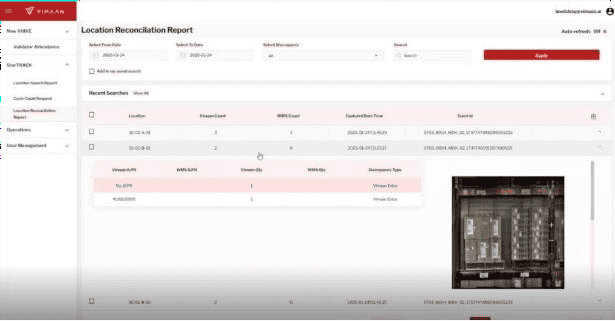
Provide Search Features to Locate a Missing Item
StorTRACK builds a “map” of every item and location in the DC. Consequently, it can serve as a “Google Street View” of the entire storage area and provides search capabilities. If an associate is looking for a particular SKU, the ViewDECK application that comes with StorTRACK can provide an easy to see, visual highlight of all the locations where that SKU was last found.
Throughput and Warehouse Associate Productivity
StorTRACK really shines at productivity in a high-density case storage situation. StorTRACK’s scan speed does not depend on the number of cases or labels on a rack face. It can scan an entire 30’ high, 8’ wide bay in 30-40 seconds – even if there are over a hundred cases in that bay! In contrast, drones must locate and stop at each label to read it, which could take several minutes per bay.
Read this case study see how a leading manufacturer doubled inventory accuracy after deploying StorTRACK in their high-density case storage environment.
To learn how StorTRACK can work in your warehouse or DC, Contact Us.
Q. What is high-density case storage and how is it different from standard pallet storage?
High-density case storage refers to warehouses and DCs where inventory is stored directly at the case or carton level on shelves, without pallets. Cases are typically stored single-deep so pickers can identify and locate products efficiently. It’s common in fashion apparel, cosmetics, footwear, medical implants, and other high-SKU industries.
Q. Why is cycle counting harder in high-density case storage environments?
High-density layouts pack cases tightly together, often with identical or closely spaced labels. Inventory also moves at high velocity, meaning infrequent cycle counts quickly become inaccurate. Achieving and maintaining 99.7%+ location accuracy requires very high cycle count frequency which is prohibitively labor-intensive with manual methods.
Q. Can drones handle cycle counting in high-density case storage?
Drones struggle significantly in high-density case environments. They rely on machine vision-based barcode scanning, which cannot disambiguate between closely spaced or identical labels, cannot count unlabeled cases, and cannot pinpoint precise inch-level locations. They also slow down significantly because they must stop at each label individually.
Q. How does StorTRACK handle cases with missing or damaged labels?
StorTRACK detects each individual case as an object, independent of its label. If a case is present but has no readable label, StorTRACK visually outlines and flags it so an associate can take action. This is a capability that purely barcode-driven drone systems cannot replicate.
Q. How fast is StorTRACK in a high-density case storage aisle?
StorTRACK can scan an entire 30-foot-high, 8-foot-wide bay in 30 to 40 seconds, regardless of how many cases are in that bay. In contrast, drones must stop at each individual label, which can take several minutes per bay, making StorTRACK significantly faster in dense environments.
Q. What does StorTRACK’s discrepancy reporting look like?
StorTRACK compares its scan results against the WMS and surfaces each discrepancy in a visual, easy-to-read format. Associates can see exactly where a mismatch exists and reconcile it without manual searching. The ViewDECK application also provides a “Google Street View”-style search so operators can locate any SKU instantly.