

warehouse insider
By Raushan Barnwal and SK (“KG”) Ganapathi
Warehouse automation is entering a different phase, and it goes deeper than any single new product or robot. For years, the smartest systems in a warehouse were the ones that planned well: forecasting demand, positioning stock, scheduling labor before the week began. Increasingly, the systems that matter are the ones that can see what is actually happening on the floor and act on it as it unfolds. That change is being driven by a handful of technologies maturing at once, and understanding how they connect matters more than tracking any one of them in isolation. Here are the four major shifts driving that change:
For years, AI in warehousing meant forecasting demand and planning ahead of time: how much inventory to order, where to position it, when to staff up. That’s shifting. AI systems are increasingly making decisions in the moment, responding to what’s actually happening on the floor rather than only to what was forecasted the week before. Planning still matters, but the newer layer is operational: systems that can act on real-time conditions as they unfold, not just prepare for conditions predicted in advance.
That shift from planning to real-time action depends on having a reliable way to see what’s actually happening, and that’s where computer vision comes in. Barcode scanning and legacy machine vision tell you what a label says. Computer vision reads the actual situation: condition, placement, and discrepancies a code alone can’t capture. That’s a meaningful upgrade in what “automated” data actually means on a warehouse floor, and it’s a big part of why AI can act in real time at all: it finally has a reliable way to see what’s happening, not just what a label claims is happening.
You may have seen the term “Physical AI” recently; it’s been popularized by NVIDIA over the past year. Physical AI refers to systems that don’t just perceive the physical world but reason about it and act autonomously, whether that’s a robot navigating a warehouse floor or a system adjusting operations on its own based on what it observes. Computer vision is the perception layer that makes this possible; Physical AI is the broader idea building on top of it, extending from seeing to reasoning to acting. Expect to hear a lot more about this over the next few years, as more of the industry moves from automating individual tasks to building systems that can perceive, decide, and act with less human intervention at each step.
Operators are increasingly building virtual, continuously updated replicas of their physical inventory, not just facility layouts, to simulate changes and catch discrepancies before they become costly. A digital twin, in this context, isn’t a static 3D model of a building; it’s a live representation that reflects what’s actually in the warehouse right now, updated continuously rather than reconstructed periodically. That distinction is what’s moving digital twins from a planning nice-to-have to a standard operational tool: an operator can test a slotting change, a layout adjustment, or a process shift against a model that reflects real, current conditions rather than an assumption about what should be there.
Even with all this movement, a large share of warehouses in North America have yet to adopt meaningful automation, and the pressure driving the rest to catch up is structural, not temporary. Labor shortages, wage growth, and a shrinking working-age population mean the case for automation gets stronger every year, not weaker. The technology shifts above aren’t speculative trends to watch from a distance; they’re arriving at the same time operators are running out of ways to solve the labor problem with the old playbook.
We’ve been building at the intersection of AI-powered computer vision and warehouse inventory for several years now, ahead of most of this becoming industry conversation. Our focus is a category we call Inventory Intelligence: going beyond basic inventory visibility and tracking to a point where a team can capture, reconcile, and act on inventory data without a manual recount to verify it.
That’s also where digital twins come in for us directly. Vimaan builds a live, reconstructed 3D model of a warehouse’s inventory using computer vision, not just a facility layout, so a team can see actual physical state, not just recorded transactions.
Our core products, StorTRACK, PalletSCAN, and ParcelSCAN, run on the same foundational platform, automating cycle counting, inbound receiving, and outbound shipping at up to 80% less labor cost than manual processes. We’re already live in some of the world’s largest warehouses and distribution centers.
If you want the deeper thinking behind our approach to computer vision and machine learning, see: The AI & Computer Vision Advantage.
Q. Where is warehouse automation headed next?
The clearest shift is from planning to real-time action: AI systems are moving from forecasting what should happen to acting on what is actually happening on the floor. That shift depends on computer vision, which gives systems a reliable way to see physical conditions rather than just read a barcode, and it’s converging with two related developments: Physical AI, where systems reason about and act on the physical world autonomously, and digital twins, which turn a warehouse’s live inventory into a model teams can test changes against before making them. Together, these are moving automation from a set of point solutions toward a more connected, real-time way of running a warehouse.
Q. What is Physical AI in a warehouse setup?
Physical AI refers to systems that perceive the physical world, reason about what they observe, and act autonomously, without needing step-by-step instructions for every situation. In a warehouse, this could be a robot navigating the floor or a system that adjusts operations based on what it sees rather than a predefined schedule. Computer vision is the perception layer that makes Physical AI possible.
Q. What is a digital twin in warehousing?
A digital twin is a continuously updated virtual representation of a warehouse’s actual inventory and operations, not just a static facility layout. Unlike a one-time 3D model, a true digital twin reflects real, current physical conditions, which lets teams test changes, like a slotting adjustment or a layout change, against reality rather than assumption.
Q. What is Inventory Intelligence?
Inventory Intelligence goes beyond basic inventory visibility or tracking. It’s the continuous, AI-driven verification of what is physically in a warehouse, its location, quantity, and condition, against what the WMS believes, so a team can capture, reconcile, and act on inventory data without a manual recount to verify it.
Q. How is computer vision different from barcode scanning or legacy machine vision?
Barcode scanning and legacy machine vision confirm what a label says. Computer vision interprets the actual physical scene: condition, placement, and discrepancies that a barcode alone can’t capture. This is what allows AI systems to act on real-time floor conditions rather than only on what was forecasted or recorded in advance.
Q. What products make up Vimaan’s Inventory Intelligence platform?
StorTRACK, PalletSCAN, and ParcelSCAN run on the same foundational AI-powered computer vision platform, automating cycle counting, inbound receiving, and outbound shipping respectively, at up to 80% less labor cost than manual processes.
warehouse insider
Creating a reliable link between the physical parcel, the correct receiving record, and the internal label used downstream
The core challenge
External carrier and supplier labels are not a common warehouse identity. If an operation cannot determine what arrived, match it to the right business record, and apply the right internal label to the same physical parcel, downstream automation begins with unreliable data.
Many operations – from large-scale distribution centers, to public institutions, to small-scale manufacturers – receive parcels from multiple suppliers, carriers, and channels. The parcel may arrive with a carrier tracking number, supplier barcode, purchase-order reference, packing label, or several labels accumulated across earlier handling steps. None may be the standardized identifier the receiving operation needs for check-in, sortation, ownership, putaway, fulfillment, or audit. Without a specially-trained Operator to know the difference, the process becomes slow and prone to error.
Vimaan’s ParcelSCAN digitizes the visible parcel, extracts candidate identifiers, applies business rules to select the correct label of interest, and provides the data needed to match the parcel to the appropriate warehouse record. Once the correct internal identity is generated, the label can be applied manually or through print-and-apply automation, with verification and exception controls protecting the parcel-to-record association.
What This Application Addresses
Why the Absence of a Common Label Creates Friction
A common internal label gives the warehouse one dependable identity for every parcel. Without it, operators must interpret whatever labels happen to be present, decide which number matters, search one or more systems, create or select a receiving record, and then make sure the newly printed label goes onto the correct parcel.
Each task is manageable in isolation. At receiving-line speed, however, the combination creates delay and multiple opportunities for error.
Three linked failure points
1. Identification is slow and inconsistent.
Different suppliers and carriers use different formats. Labels may be placed on any visible face, folded over an edge, partially damaged, or surrounded by unrelated barcodes. Operators must know which field to use and may have to rotate or rescan the parcel.
2. A successful read is not the same as a correct match.
Reading a barcode only proves that a code was detected. The operation must still determine whether it is the carrier tracking number, supplier carton ID, PO reference, product identifier, or another code—and whether that value maps to exactly one valid receiving record.
3. Label application can break the chain of identity.
Even when the correct internal label has been generated, it can be applied to the wrong parcel, placed where it cannot be read downstream, duplicated, or released before application is confirmed. Both manual and automated application require explicit rules.
A read is only valuable when it drives the correct transaction
The business outcome is not simply barcode capture. It is a controlled association among the physical parcel, the selected external identifier, the correct system record, and the newly assigned internal label.
Common operational consequences
From External Labels to a Verified Warehouse Identity
Vimaan’s ParcelSCAN supports a stepwise receiving workflow in which each decision is validated before the parcel is released. The exact system boundaries vary by deployment: ParcelSCAN may supply image, OCR, barcode, and label-location data while a WMS, WES, ERP, or integrator performs database lookup, label generation, conveyor control, and print-and-apply logic.
| Step | Control | What happens |
| 1 | Capture | Image visible parcel faces and read candidate labels |
| 2 | Identify | Select the identifier of interest using defined rules |
| 3 | Match | Query receiving data for the correct business record |
| 4 | Create | Generate or retrieve the required internal identifier |
| 5 | Apply | Release the print job and bind it to the parcel event |
| 6 | Verify | Confirm the expected label on the same physical parcel |
| 7 | Release | Continue the parcel or divert it to exception handling |
The Decision Rules Matter as Much as the Imaging
Rules may use carrier format, supplier profile, symbology, field length, label location, nearby text, shipment context, or a prioritized hierarchy. The first readable barcode is not automatically the correct one. A one-to-one match may proceed; zero-match or multi-match results should pause the transaction and prevent uncertain label generation.
What ParcelSCAN Contributes and How Exceptions are Handled
Comprehensive Data Capture and Intelligent Field Selection
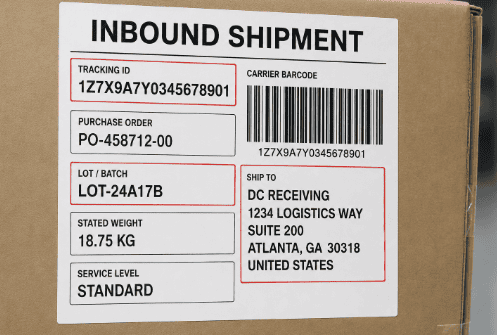
ParcelSCAN does more than search for a single predetermined barcode. It records the full set of visible information on the parcel: including barcodes, printed text, addresses, shipping references, lot, batch or manufacturing codes, stated weight, and other relevant markings. Parcel dimensions can also be captured when they are required for the receiving or routing workflow.
Vimaan’s AI and machine-learning models then determine which information is relevant to the immediate business decision. This may mean identifying the correct unique parcel identifier from several visible labels, or evaluating a combination of fields when no single value is sufficient. For example, a workflow could compare the stated weight, lot or manufacturing code, destination address, and parcel dimensions against expected receiving data before determining the correct system record or routing destination.
This creates two distinct capabilities:
This is especially valuable when routing decisions depend on printed destination-address text rather than a standardized barcode. ParcelSCAN does more than search for a single predetermined barcode. It records the full set of visible information on the parcel: including barcodes, printed text, addresses, shipping references, lot, batch or manufacturing codes, stated weight, and other relevant markings. Parcel dimensions can also be captured when they are required for the receiving or routing workflow. can interpret that address information and use it to direct parcels to the appropriate delivery center or downstream workflow.
Integration and ownership boundaries
The solution can exchange data through APIs, messages, or file-based interfaces depending on the surrounding architecture. Before deployment, responsibilities should be explicit for trigger signals, parcel tracking, OCR and barcode outputs, database lookup, internal-ID generation, print-job creation, applicator control, verification, reject handling, and the final receiving transaction.
This separation allows ParcelSCAN to operate as the parcel digitization and validation layer while the warehouse platform or system integrator retains the business transaction and material-handling logic. It also avoids embedding customer-specific receiving rules in the wrong component.
Exception handling is part of the production workflow
| Exception | Controlled Response |
| No readable identifier | Retain images, retry using alternate views, or route to operator review without generating an internal label |
| Multiple candidate identifiers | Apply label-of-interest rules; if ambiguity remains, show candidates and hold the parcel for confirmation |
| No system match | Prevent automatic receipt and label creation; route to a defined unmatched-parcel queue |
| Multiple system matches | Block automatic assignment until the correct record is resolved. |
| Print/apply failure | Keep the parcel associated with the open transaction and divert it for reprint or manual application |
| Verification failure | Do not release the parcel until the expected label is detected or the event is resolved by an authorized operator |
Visible-data boundary
ParcelSCAN can validate information visible on the parcel exterior. If required item-level, serial, country-of-origin, or other data is sealed inside a carton, the process must expose that information through standardized external labeling, an upstream data association, or a defined open-carton exception.
Label Application Options and Operational Outcomes
All profiling events are automatically stored within ViewDECK, Vimaan’s web-based visualization and analytics platform.
Choosing the right label application approach
After ParcelSCAN identifies the parcel and generates the correct internal label, the label can be applied through either a fully automated or operator-assisted workflow.
Automatic print-and-apply offers the highest level of automation and is particularly valuable for high-volume, standardized conveyor operations. However, it requires specialized equipment, precise parcel tracking and placement rules, dimension measurements, controls integration, and additional engineering, making it the more expensive option to deploy. ParcelSCAN functions as the vision and parcel identify platform in a larger system, which can be managed by a Systems Integrator or In-house team.
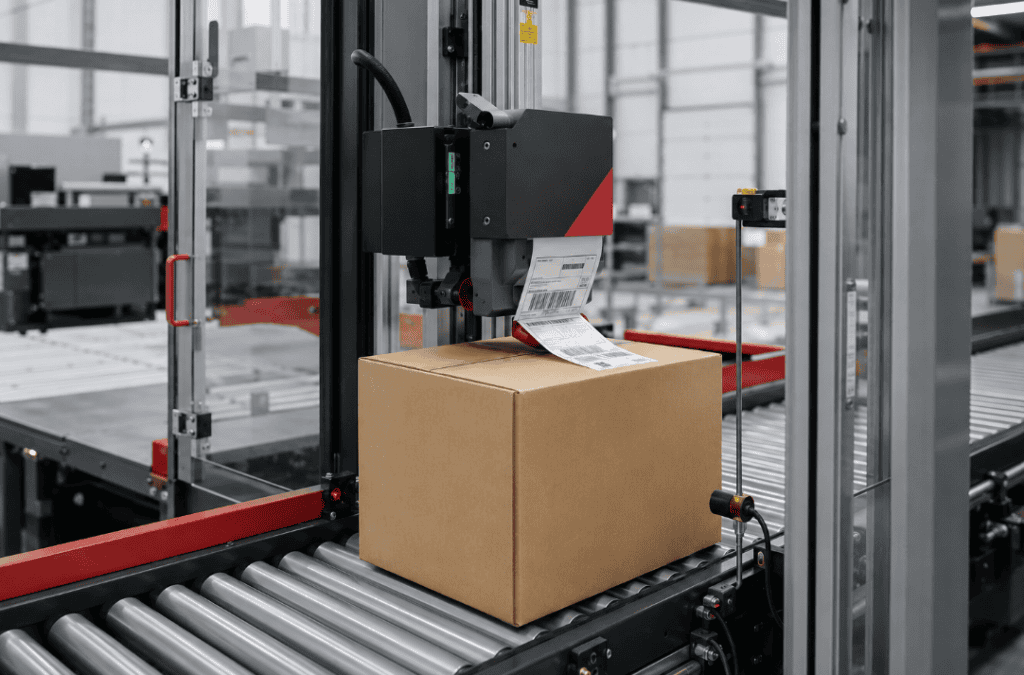
Operator-assisted application provides a lower-cost alternative. ParcelSCAN prints the correct label and presents the corresponding parcel information and placement instructions through Vimaan’s user interface. An operator then confirms the parcel and manually applies the label. This approach still reduces identification and matching errors while requiring less equipment and integration, although it retains a manual step in the receiving process.
Rules to define before production
Expected operational value
Inbound internal labeling is not a printing problem alone. It is an identity-control process. The receiving operation must determine what the parcel is, match it to the correct business record, create the right warehouse identifier, and ensure that identifier is applied to and verified on the same physical parcel.
ParcelSCAN provides the imaging, data capture, and validation layer needed to make that chain reliable. Combined with well-defined business rules and clear system ownership, it replaces slow, inconsistent identification with a repeatable receiving workflow—and gives downstream automation a trustworthy parcel identity from the moment of receipt.
Q1. What is inbound internal labeling and why does it matter?
Pallet profiling is the process of capturing true 3D dimensions, geometry, and load condition of a pallet while it moves through a facility. For warehouses using automated conveyors, AS/RS, or AGVs, incoming pallets must meet strict physical requirements. A pallet that is over-height, leaning, or has overhang can cause conveyor jams, sorter misroutes, or AS/RS failures. Profiling at entry points prevents these problems before they propagate downstream.
Q2. Why can’t the operation just use the carrier or supplier label that arrives on the parcel?
Carrier and supplier labels serve the upstream transport chain, not the warehouse. A single parcel may arrive with a carrier tracking number, a supplier carton ID, a PO reference, a shipping label, and accumulated labels from earlier handling. None of these is guaranteed to be the identifier the warehouse needs for its own systems. Without translation to an internal label, every downstream system has to interpret external labels differently.
Q3. How does ParcelSCAN identify the correct label when multiple barcodes are present?
ParcelSCAN captures all visible barcodes, printed text, addresses, lot codes, and other markings on the parcel exterior. Deployment-specific business rules then determine which identifier is relevant for the immediate transaction, based on carrier format, supplier profile, symbology, field length, label position, or a prioritized hierarchy. The first readable barcode is not automatically selected; the rules govern which value is used for matching and label generation.
Q4. What happens when ParcelSCAN cannot find a match or finds multiple matches?
ParcelSCAN is designed to handle ambiguity explicitly rather than defaulting to an uncertain outcome. If no identifier is readable, the parcel is held for operator review without generating an internal label. If multiple candidates are found and rules cannot resolve them, the transaction pauses for confirmation. If no system record matches, automatic receipt and label creation are blocked. These controls prevent mislabeling from propagating downstream.
Q5. Does the operation need automated print-and-apply equipment to use ParcelSCAN?
No. ParcelSCAN supports both automated print-and-apply and operator-assisted label application. The automated path is suited to high-volume conveyor operations but requires additional equipment and integration. The operator-assisted path prints the correct label and presents placement instructions on-screen; an operator confirms and applies it manually. Both options benefit from ParcelSCAN’s identification and matching accuracy.
Q6. What is ViewDECK and how is it used in this workflow?
ViewDECK is Vimaan’s web-based visualization and analytics platform. In the inbound labeling workflow, it stores time-stamped parcel images, extracted data, match results, and exception history for every receiving event. Operators and managers can search historical records, investigate exceptions, and reconstruct the receiving chain for any parcel — supporting audits, claims, and process improvement.
warehouse insider
Vimaan develops AI-powered computer vision solutions that automate warehouse validation, inspection, and inventory workflows. Rather than replacing existing WMS, WCS, or automation systems, Vimaan provides real-time visual intelligence that helps customers verify inventory, shipments, pallet quality, and warehouse operations.
The PalletSCAN product family is designed to automate pallet validation across receiving, storage, production, and shipping workflows using a common software platform and analytics environment.
| Product | Primary Function |
| PalletSCAN 360 | Multi-sided pallet inspection and shipment verification |
| PalletSCAN 3D | Dimensioning, overhang, lean, Ti-Hi counting and SKU validation, and pallet profiling |
| PalletSCAN 100-D | Drive-by pallet face capture, LPN/SKU validation; quality checks |
This application note focuses on pallet profiling using PalletSCAN 3D, which is designed for inline dimensioning, lean detection and load integrity validation on conveyors and with AGVs/AMRs.
Modern warehouses and distribution centers increasingly rely on automated conveyors, automated guided vehicles (AGVs), sorters, and AS/RS systems to achieve high throughput and predictable performance. These systems assume that incoming pallets and parcels meet strict physical requirements, including correct dimensions, stable geometry, proper orientation, and acceptable load condition.
In reality, upstream variability introduces risk. Pallets or parcels may be over-height, skewed, leaning, partially collapsed, or unstable. When these items enter automated material handling systems unchecked, the result is often reduced throughput, unplanned stoppages, jams, or costly manual intervention.
To maintain the operational flow and automation gains, operators need a way to automatically profile items as they move through the facility, without slowing operations.
Pallet (and parcel) profiling goes beyond simple barcode identification. It creates a digital twin of each load while scanning in motion.
This includes:
This information can be evaluated in real time against system limits or stored for audit and analytics.
Material Handling systems are often already in-place. On conveyors, items are already constrained in speed, direction, and spacing; making them ideal candidates for automated inspection. Similarly, AGVs/AMRs make tightly controlled and predictable maneuvers.
Key drivers:
Preventing induction/handling failures (Ensuring loads meet robotic handling tolerances)
Rather than reacting to failures inside automation, conveyor and AGV-based profiling allows operations to shift left and detect problems at entry points.

Key capabilities include:
The system is designed to operate at typical conveyor speeds and spacing, supporting both average and peak throughput conditions.
Operational Outcomes

Customers deploying conveyor-based profiling typically see:
Most importantly, automation behaves as designed because the inputs are controlled.
Production-Tested Accuracies*
| Parameter | Accuracy |
| Depth Accuracy (<=0.5 in) | > 98% |
| Width Accuracy (<=0.5 in) | > 98% |
| Height Accuracy (<=0.5 in) | > 98% |
| Front / Back OverHang Accuracy (<=2.0 in) | > 98% |
| Left OverHang Accuracy (<=2.0 in) | > 98% |
| Right OverHang Accuracy (<=2.0 in) | > 98% |
*Accuracies can depend on speed of travel, shrinkwrap or other protrusions, etc.
All profiling events are automatically stored within ViewDECK, Vimaan’s web-based visualization and analytics platform.
Operators can:
By combining dimensional measurements with synchronized imagery, ViewDECK provides a permanent digital record of each inspected load, simplifying troubleshooting and customer claim resolution.
To see how PalletSCAN 3D can integrate with your conveyor or AGV setup and prevent automation failures at the source, Contact Us.
Q. What is pallet profiling and why does it matter for warehouse automation?
Pallet profiling is the process of capturing true 3D dimensions, geometry, and load condition of a pallet while it moves through a facility. For warehouses using automated conveyors, AS/RS, or AGVs, incoming pallets must meet strict physical requirements. A pallet that is over-height, leaning, or has overhang can cause conveyor jams, sorter misroutes, or AS/RS failures. Profiling at entry points prevents these problems before they propagate downstream.
Q. How does PalletSCAN 3D profile pallets without stopping the line?
PalletSCAN 3D uses computer vision and 3D reconstruction to profile pallets inline as they move at normal conveyor speeds. It does not require the pallet to stop or rotate. The system captures true 3D dimensions, detects lean and skew, identifies overhang, and generates pass/fail signals to the WMS, WCS, or PLC in real time.
Q. What does PalletSCAN 3D actually measure?
It captures length, width, and height with accuracy within 0.5 inches at over 98% reliability. It also measures volume, detects front/back and left/right overhang to within 2 inches, identifies lean and skew relative to gravity and the conveyor centerline, and flags asymmetrical or unstable load builds. Every scan is image-synchronized for traceability.
Q. Where in the workflow should pallet profiling happen?
Pallet profiling should happen at induction points wherever pallets enter an automated system. This includes conveyor induction from receiving docks, AS/RS entry points, and AGV/AMR handoff zones. The goal is to catch non-compliant pallets before they reach automated handling, not after a failure has already occurred.
Q. How are profiling results stored and reviewed?
All profiling events are automatically logged in ViewDECK, Vimaan’s web-based analytics platform. Operators can search historical profiles, review dimension data and images, investigate exceptions, and export records for audits or customer claim resolution. Data is available across facilities for trend analysis.
Q. Does pallet profiling work with AGVs and AMRs, not just conveyors?
Yes. AGVs and AMRs make tightly controlled, predictable movements, which makes them well-suited for automated profiling. PalletSCAN 3D can be configured to profile loads carried by AGVs and AMRs using the same gate-based approach used on conveyors.
warehouse insider
Discover how StorTRACK automates case counting on full and partial pallets using computer vision and depth mapping. Improve warehouse accuracy and reduce manual labor.
Distribution Centers (DCs) and warehouses often rely on a mix of traditional setups and evolving automation solutions. Most store inventory in rack systems as full pallets, with the bottom 1–2 levels used as “pick levels” for cases or partially picked pallets, while upper levels serve as “reserve locations.” Cycle counting these reserve locations is relatively simple — reading the Pallet ID (or LPN) and then verifying its location. Because full pallets typically contain a unique SKU and a known number of cases, the WMS can determine inventory totals and locations accurately.
However, over time, warehouse inventory accuracy issues still accumulate. It is common practice to conduct manual physical inventory processes, where operations shut down for manual reconciliation of on-hand inventory against WMS records.
While this setup works for conventional operations, it also reveals the inefficiencies of manual processes and highlights the need for automated cycle counting and pallet scanning solutions that improve scalability, accuracy, and efficiency.
In many DCs, picking occurs at all rack levels due to high SKU volume, making it impractical to limit access to just the lower racks. This is especially true in sectors like food distribution and automotive parts. When cases are picked from various levels, partial pallets result. These are harder to count since the remaining cases may be behind the pallet’s front-facing edge. The cycle counter must not only confirm the Pallet ID and location but also manually count the remaining cases, adding complexity and increasing the chance of error.
Automated cycle counting solutions help overcome these challenges by scanning and validating pallet content — even partial pallets — without requiring manual intervention. This reduces the manual physical inventory processes burden that plagues many warehouses with unnecessary labor costs and operational disruptions.
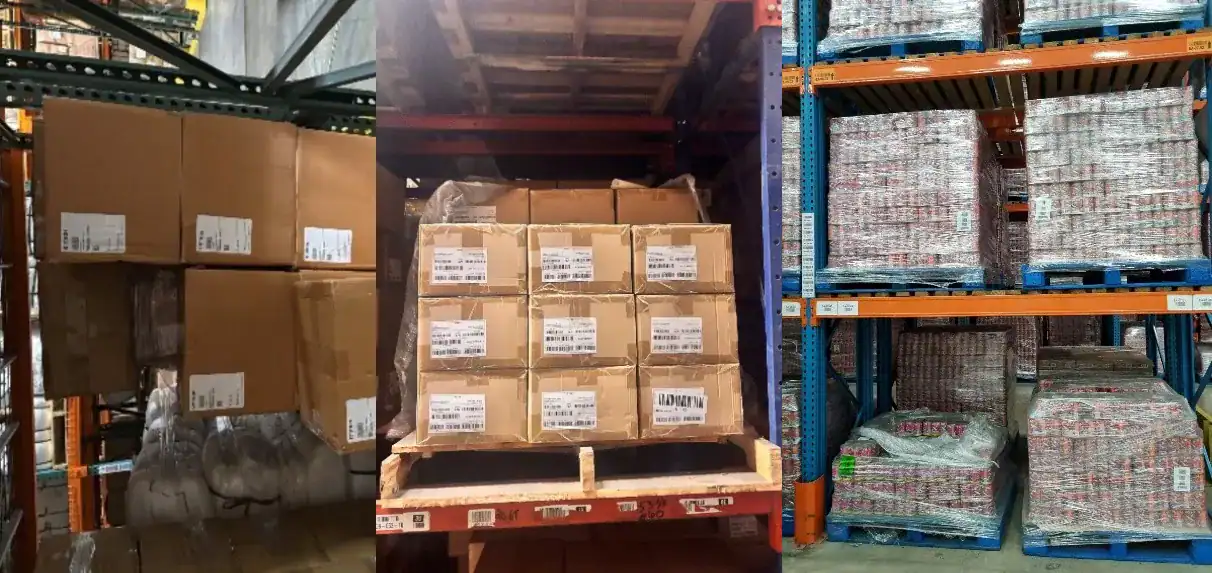
An example of a full pallet is shown Figure 1; different examples of partial pallets are shown in Figure 2.
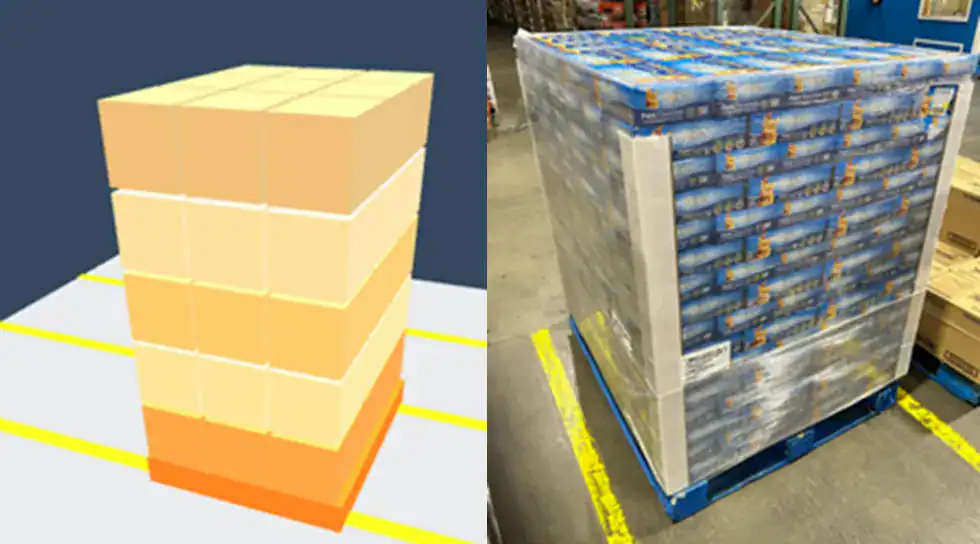
Automated cycle counting solutions are usually based on computer vision or barcode reading, both of which require visual line of sight to the items on the rack. Therefore, such solutions are only able to look at the “face” of a rack. Even in such situations, one can usually accurately infer the number of cases on a partially picked pallet – under certain assumptions as listed below.
1. The pallets should be stored single deep in the racks. Pallets that are hidden behind another pallet cannot be seen from the aisle.
2. The number of cases on the original full pallet should be known. This can come from the Ti-Hi structure of the pallet or from information contained in the WMS. It is not a requirement that the cases should be arranged in a Ti-Hi manner on the pallet.
3. All the cases on the pallet are assumed to be single SKU and of uniform dimensions.
4. When the pallet is placed on the rack shelf and cases are picked from it, cases *should not* be picked from the “back” of the pallet. In other words, pickers should pick from the aisle, and every case picked should result in a visible “missing case” when viewed from the aisle. Examples of cases picked from the front and picked from the back are shown in Figure 3 and Figure 4.


If these four key assumptions are met, Vimaan’s StorTRACK can infer the number of cases remaining in a partially picked pallet. The methodology used by the solution is as follows:
1. As StorTRACK moves parallel to the surface of the rack, it not only captures images of each pallet and case; it also creates a “depth map” that measures the distance from StorTRACK to the item being mapped. This generates a 3D point cloud which provides a high resolution map of every point on the inventory items with respect to the surface of the rack. If certain items are protruding from the surface of the rack, these can be measured; conversely, all points that are recessed from the rack surface are also accurately mapped.
2. The depth map generated by StorTRACK has dimensional fidelity, which means that it accurately measures the distance by which a certain point is either recessed or protruding from the surface of the shelf.
3. The depth map for a full pallet is therefore a plane which represents the front surface of the pallet. The dimensions of this plane represent the width and height of the front face of the pallet.
4. If a pallet is built in a Ti-Hi manner and an entire layer is picked from the pallet while it is on the shelf, the front surface will still be a plane with the same width as the original pallet, but with a height that is less than the height of the original pallet by the height of a single layer. In this manner, if entire layers are picked from a pallet, StorTRACK can use the planarity of the pallet and the width and height dimensions to determine how many layers have been picked. With this information, since StorTRACK also knows the original Ti-Hi structure and original number of cases on the pallet (Assumption #3), it can infer how many cases are still remaining on the pallet.
5. In a situation where a layer is partially picked, as long as cases are picked from the front, StorTRACK uses its depth map to first calculate how many layers are still complete (using Step 5 above). If a layer is incomplete, the depth map would vary across the width of the pallet. For example, if two cases have been picked from the top layer, then the depth of those two locations would increase by the depth of a case. Using this reconstruction, StorTRACK can accurately infer how many cases have been removed from any given layer. Since it also knows how many cases are on a given layer, it can also infer how many cases are remaining in that layer, and consequently, in that pallet.
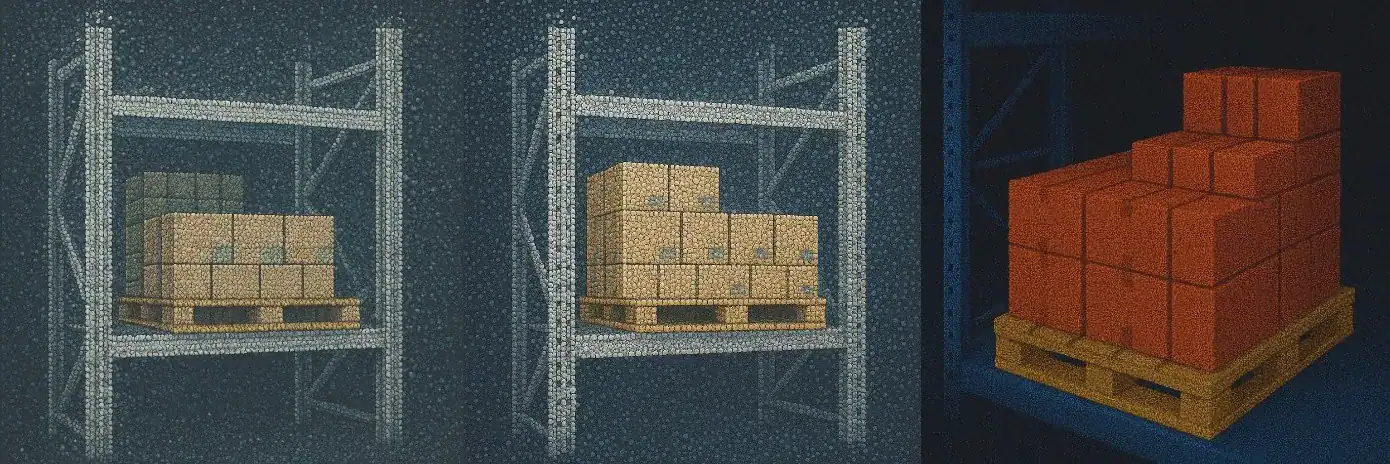
Several examples of how the number of cases can change through picking and the resulting depth maps generated by StorTRACK are shown in Figure 5 and Figure 6.

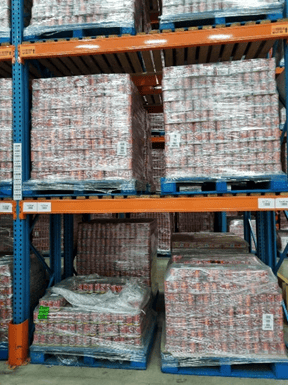
There are of course many real-life scenarios where a depth map cannot provide unambiguous case counts. For example, sometimes, pickers leave pallets partially shrink-wrapped, which results in uneven coverage of the pallet by shrink-wrap (see Figure 7 for example). Or they could disturb multiple other cases when they remove one case from the pallet. Sometimes, they don’t follow the Standard Operating Procedures and pick from the back. Other challenges may have nothing to do with picker behavior: If the case sizes are extremely small in relation to the pallet dimensions, errors in the depth maps or dimensional measurements may cause case counting or even layer counting errors. All these scenarios can generate irregular or unreliable depth maps.
In each of these scenarios, since StorTRACK automatically compares its inferred case count results against the WMS, it immediately highlights any discrepancy along with images of the location. In most cases, the image of the pallet can be viewed by the inventory clerk on a tablet or desktop and the number of layers and cases on the pallet can be counted manually just based on the image (if the assumptions hold true). In certain situations, it is not even possible to count the remaining cases on a pallet just from an image, and these specific locations will need to be verified by a cycle counter by physically visiting the bin location.
For a broader overview of the partial pallet counting problem and how computer vision solves it, read our blog post.
To learn how StorTRACK can work in your warehouse, Contact Us.
Q. What is a partial pallet and why is it harder to count than a full pallet?
A partial pallet results when cases are picked from a full pallet that’s still stored on a rack shelf, leaving behind a mix of full and empty positions. Unlike full pallets, which have a known SKU and a fixed case count verifiable via the WMS, partial pallets require a physical count of remaining cases which is a time-consuming, error-prone step that slows down cycle counting significantly.
Q. What assumptions need to be met for automated case counting to work on partial pallets?
Four conditions must hold: pallets must be stored single-deep so they’re visible from the aisle; the original full pallet case count must be known from the WMS or Ti-Hi structure; all cases on the pallet must be a single SKU and uniform in size; and pickers must pick from the front of the pallet, not the back. When cases are pulled from the back, the aisle-facing surface doesn’t reflect what’s been removed.
Q. How does StorTRACK count cases on a partial pallet?
As StorTRACK moves along the rack aisle, it captures both images and a depth map of each pallet, a 3D point cloud that measures how far each point protrudes or recedes from the rack surface. By comparing the depth profile of a partial pallet against the known dimensions of a full pallet, StorTRACK infers how many complete layers remain and how many cases have been removed from any partially picked layer.
Q. What happens when the depth map can’t give a clean count?
In scenarios with partial shrink-wrap, disturbed case stacking, or cases picked from the back, the depth map may be irregular or ambiguous. In these cases, StorTRACK automatically flags the discrepancy, surfaces an image of the location, and routes it for manual review – either a visual count from the image or a physical visit to the bin. The system never silently accepts an uncertain count.
Q. Does StorTRACK require pallets to be arranged in a Ti-Hi pattern?
No. While knowing the original Ti-Hi structure helps StorTRACK infer the total case count, the cases don’t need to remain arranged in Ti-Hi order on the pallet. StorTRACK uses the depth map geometry to reconstruct what’s present regardless of how cases are stacked, as long as the four core assumptions are met.
warehouse insider
Many Distribution Centers (DCs) and warehouses store inventory directly at the case level rather than as pallets. This is more common when a manufacturer or brand has thousands or even tens of thousands of SKUs in the DC, and items are being picked directly from every storage location. In such situations, cases (or cartons) are stored directly on shelves, with no pallets. There may also be a blurring of the boundaries between “locations” – each shelf is densely and fully packed with cases abutting each other to occupy every inch of space on the shelf.
High density case storage is often seen with fashion apparel, cosmetics, shoes, medical implants and other such products that by definition have a high number of SKUs to account for sizes, styles, colors, and seasons. Other products that use high density storage are irregularly shaped items such as rugs, furniture or home decoration products.
A generally common feature of high-density case storage is that the cases are stored single-deep. This is to usually enable pickers to more easily identify and locate the products during the pick process. It is also done to ease the process of cycle counting and inventory counting – multi-deep storage of cases at high density would make it extremely difficult to both locate as well as pick cases during order fulfilment. Examples of high-density case storage are shown in Figure 1.

While high density case storage offers advantages of increased warehouse space utilization, it is critical to maintain high accuracy of inventory location and know exactly where a given case with a given SKU is, so that pickers can know exactly where to go and be assured that the case/SKU that they are looking for is present in exactly the right location. Even small mis-placements of the cases – even if within the same shelf – can result in lost productivity if pickers have to spend their time searching the entire shelf for a particular case/SKU. Conversely, if a case is “misplaced” for whatever reason, it becomes very hard to locate that case because of the high density of storage and the sheer volume of cases in the facility. Given that these DCs typically store hundreds of thousands of cases at a given time and pick thousands of cases each day to fulfill orders, even a 99% accuracy is inadequate; target location accuracies for such warehouses often need to be upwards of 99.7% to maintain the flow of pickers and not delay shipments due to unlocatable inventory.
Achieving and maintaining such a high accuracy – especially at large DCs with high SKU count, high density, and high volume — can be a significant challenge. The traditional method is of course cycle counting – multiple cycle count associates are dedicated to the task of verifying the locations of various SKUs and cases on an everyday basis, and “cycling” through the DC or warehouse at a specified frequency, such as every month or every quarter. But given the nature of the products stored in these warehouses, the inventory also moves at a high “velocity” – which makes such infrequent cycle counting less useful. This of course poses the classic cycle counting cost vs. accuracy tradeoff: To maintain very high accuracy, the cycle count frequency needs to be very high (ideally 2-4 times per month), but the labor costs of such a high frequency cycle count pose an undue burden on the operation. An example of a densely packed location with multiple units of a SKU and multiple SKUs is shown in Figure 2.

Warehouse and DC Operations leaders are therefore naturally turning to automated solutions for cycle counting. There are three “classes” of automated cycle count solutions available in the market today. Below, we provide a synopsis of each approach and an analysis of why StorTRACK from Vimaan is an ideal solution for automated cycle counting of high density case storage.
● Drones automate the cycle counting process by flying from one location to another, using machine vision cameras to scan barcodes and simultaneously associating the location of the drone at the time of the barcode scan to that of the inventory item.
● StorTRACK is a computer vision enabled “sled” that can be picked up by any Material Handling Equipment (MHE) such as a forklift, cherry picker or similar equipment. The unit is manually operated and captures the entire face of the rack as it moves down the face of the aisle. It “reconstructs” the inventory in the racks and provides a true digital “twin” of the racks – reading barcodes, extracting text, and identifying the precise locations of the cases.
Below we provide a comprehensive and objective comparative analysis between StorTRACK and drones for automated cycle counting of high density case storage. The analysis compares the solutions on a few dimensions as listed below, and on each of these factors, we show how StorTRACK vastly outperforms drones: in fact, we explain why drones simply cannot handle high density case storage applications.
1. Identify, locate and count cases
2. Highlight discrepancies against the WMS
3. Provide “search” feature to locate an item
4. Throughput and warehouse associate productivity
Identify, Locate and Count Cases
High density case storage poses several challenges for an automated cycle counting product that StorTRACK handles better than drones.
● The high-density results in labels being placed very close together (sometimes within inches of each other). Many of the cases are identical to each other; so the labels can also be identical – which in turn requires a solution that can distinguish and separate two labels that may be identical to each other.
● The computer vision technology used by StorTRACK’s can read and “disambiguates” such labels no matter how close they are to each other. It detects, identifies and separates the cases based on AI model training. It also uniquely associates each label to a particular case on which the label is placed. This model training is effective regardless of whether the labels are unique or identical (non-unique) to each other.
● Drones cannot separate or disambiguate between labels that are placed closely together because they use a single camera that is based on machine vision and do not have the spatial resolution to separate out closely spaced labels. This problem is even more acute when the labels are non-unique and identical to each other; drones cannot distinguish between one case and a neighboring identical case that has the same label.
● Often a case may not have a label (because it is missing or the label is not facing the aisle), or it may have an unreadable label (because the label is damaged or partially obscured.) In these situations, it is important to detect and highlight such “non-compliance”.
● StorTRACK independently “detects” each individual case and associates each label with a case. In a situation where there is a case but no label associated with it, StorTRACK clearly highlights it visually by outlining the case and its location visually on the shelf so that an associate can take action and apply a label.
● Drones only look for labels that are spatially separated and unique. If a case is missing a label, drones will not be able to highlight such cases.
● Some situations require a cycle counting solution to “count” the number of cases of a particular SKU in a specific location, even if some of them do not have labels facing outward or labels that are too small to be read.
● StorTRACK’s computer vision technology gives it “human-like” capabilities. As a result, it is able to identify and count cases very accurately, even though the cases look identical and may be tightly packed against each other.
● On the other hand, drones do not get a “full view” of the shelf but are narrowly focused on locating and reading each barcode. As a consequence, they are unable to count cases or items on a shelf.
● Warehouse operators need very precise location identification of cases in order to minimize the time required to search for an item. This requires location accuracies that may be as small as a few inches.
● Because of the extensive sensor capabilities, StorTRACK has very fine mapping and positioning capability for each of the cases and the labels identified. It calibrates against the locations of the fixed warehouse assets and is thus able to provide accuracy to within inches of where a case or a label is.
● Drones use machine vision based barcode scanners and therefore are unable to pinpoint the location of the label within the field of view of the camera.
Some examples of how StorTRACK identifies cases, pinpoints discrepancies, and counts cases are shown in Figure 3.

Highlight Discrepancies against a WMS
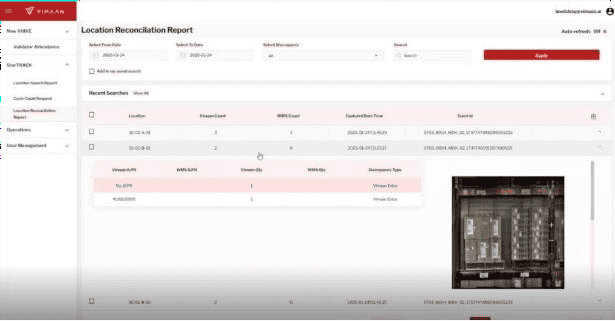
Since StorTRACK can precisely locate and count cases and labels, it can also compare these locations against the WMS and highlight discrepancies. Each individual discrepancy and non-compliance is provided in an easy to see, visual format, thus enabling easy reconciliation and update of the WMS by the associate. An example of such a report is shown in Figure 4.
Provide Search Features to Locate a Missing Item
StorTRACK builds a “map” of every item and location in the DC. Consequently, it can serve as a “Google Street View” of the entire storage area and provides search capabilities. If an associate is looking for a particular SKU, the ViewDECK application that comes with StorTRACK can provide an easy to see, visual highlight of all the locations where that SKU was last found.
Throughput and Warehouse Associate Productivity
StorTRACK really shines at productivity in a high-density case storage situation. StorTRACK’s scan speed does not depend on the number of cases or labels on a rack face. It can scan an entire 30’ high, 8’ wide bay in 30-40 seconds – even if there are over a hundred cases in that bay! In contrast, drones must locate and stop at each label to read it, which could take several minutes per bay.
Read this case study see how a leading manufacturer doubled inventory accuracy after deploying StorTRACK in their high-density case storage environment.
To learn how StorTRACK can work in your warehouse or DC, Contact Us.
Q. What is high-density case storage and how is it different from standard pallet storage?
High-density case storage refers to warehouses and DCs where inventory is stored directly at the case or carton level on shelves, without pallets. Cases are typically stored single-deep so pickers can identify and locate products efficiently. It’s common in fashion apparel, cosmetics, footwear, medical implants, and other high-SKU industries.
Q. Why is cycle counting harder in high-density case storage environments?
High-density layouts pack cases tightly together, often with identical or closely spaced labels. Inventory also moves at high velocity, meaning infrequent cycle counts quickly become inaccurate. Achieving and maintaining 99.7%+ location accuracy requires very high cycle count frequency which is prohibitively labor-intensive with manual methods.
Q. Can drones handle cycle counting in high-density case storage?
Drones struggle significantly in high-density case environments. They rely on machine vision-based barcode scanning, which cannot disambiguate between closely spaced or identical labels, cannot count unlabeled cases, and cannot pinpoint precise inch-level locations. They also slow down significantly because they must stop at each label individually.
Q. How does StorTRACK handle cases with missing or damaged labels?
StorTRACK detects each individual case as an object, independent of its label. If a case is present but has no readable label, StorTRACK visually outlines and flags it so an associate can take action. This is a capability that purely barcode-driven drone systems cannot replicate.
Q. How fast is StorTRACK in a high-density case storage aisle?
StorTRACK can scan an entire 30-foot-high, 8-foot-wide bay in 30 to 40 seconds, regardless of how many cases are in that bay. In contrast, drones must stop at each individual label, which can take several minutes per bay, making StorTRACK significantly faster in dense environments.
Q. What does StorTRACK’s discrepancy reporting look like?
StorTRACK compares its scan results against the WMS and surfaces each discrepancy in a visual, easy-to-read format. Associates can see exactly where a mismatch exists and reconcile it without manual searching. The ViewDECK application also provides a “Google Street View”-style search so operators can locate any SKU instantly.
warehouse insider
If you have been looking for ways to speed up parcel and package receiving and shipping at your warehouse or distribution center, you have probably come across the phrase “Scan Tunnel”. It gets used loosely, sometimes to describe a specific piece of hardware and sometimes as a term for any automated scanning setup on a conveyor. You may also see it referred to as ”Vision Tunnel” by the legacy solution providers in the industry. This guide covers what a scan tunnel is, how does it work, what the different configurations look like, how the technology looks like and how to know if your warehouse/DC needs a scan tunnel.

A scan tunnel is a fixed scanning station that can automatically read barcodes and extract other information from parcels and packages as they move along a conveyor belt, with the breadth of information captured varying by the technology used. Instead of someone standing at a dock with a handheld scanner checking each item one by one, the scan tunnel captures all this information continuously while the items move on the conveyor, without any manual intervention.
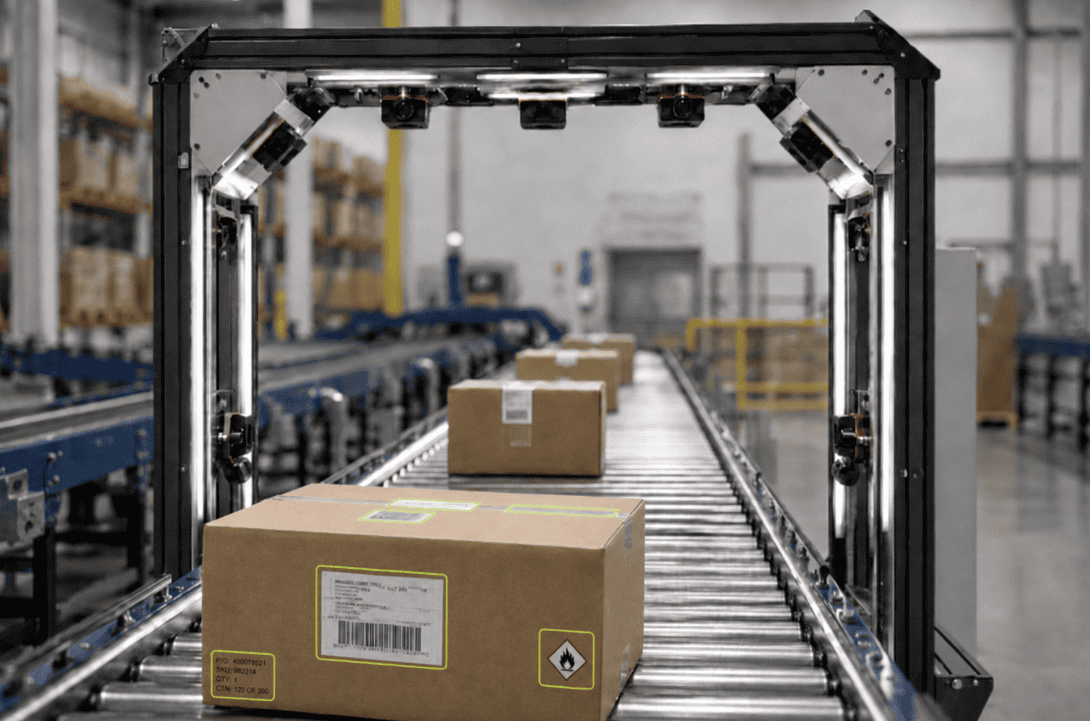
The term “tunnel” refers to the physical form factor: cameras and sensors are mounted in an arch or enclosure over the conveyor, so packages pass through or under them as they travel down the line. Depending on the configuration, a system can extract information from just one side of the package or up to six sides simultaneously.
Whatever information a scan tunnel captures, it feeds that data to the WMS where each package/parcel is validated against a purchase order or shipping manifest and discrepancies are flagged. The more capable systems like Vimaan’s ParcelSCAN are modular and configurable rather than fixed function: a single tunnel can pair barcode reading with label text extraction, image capture, dimensioning, damage detection, weight and RFID integration. The configurations and underlying technologies that determine these capabilities are covered later in this guide.
When these capabilities are modular, different warehouses and DCs can configure them for different combinations depending on their operational needs. For example, 3PLs may prioritize dimensioning or weight (for freight billing validation), e-commerce companies may prioritize damage detection (for end customer satisfaction and reduced claims), pharma and high-end apparel manufacturers may need item counting and RFID integration for regulatory and high value item tracking respectively. The right configuration depends on your industry, workflow, and operational needs, rather than a one-size-fits-all approach.
A scan tunnel works as a continuous, automated pipeline. Packages are placed on a conveyor, either by an automated upstream system or by an operator at the feed end, and travel through the scan station. As each parcel or package enters the scanning zone, the system detects its presence and extracts the barcode and other information.

What happens next depends on the integration setup. In most warehouses, the scan data flows directly to the WMS, which updates inventory status, validates the item against a purchase order or bill of lading, and flags any discrepancies. Some setups route alerts to an operator for manual review. In more automated environments, the system can communicate directly with a PLC controller to physically divert items on the line.
How a scan tunnel or vision tunnel performs and what all information it can capture, comes down to two key variables: configuration, and technology. Let’s look at each in turn below.
The first variable is configuration: how many sides of a parcel or package the tunnel reads. The more sides covered means more complete information capture, though each added side increases cost and complexity.
Top-down (1-sided)
A top-down configuration uses a single camera to read the top face of the parcel or package as it passes. It works well when labels are consistently placed face-up and is the most cost-effective starting point. Many smaller operations with predictable label placement run top-down only.
3-sided
A 3-sided configuration adds side cameras to capture the left and right faces of a parcel or package as well. It covers the most common label positions and is a good middle ground for operations where label placement is not perfectly consistent.
5-sided
A 5-sided configuration reads the top and all four sides of a parcel or package, basically everything except the bottom resting on the conveyor belt. It is what the most high-volume operations targeting comprehensive coverage use. It requires some spacing between parcels or packages on the conveyor, since the system needs a clear view of the front face of one box before the next one blocks it.
6-sided
A 6-sided configuration adds a bottom read, typically achieved through a gap in the belt or a mirror system underneath. It is technically complex and significantly more expensive than 5-sided systems, which is why very few operations have deployed it, typically only those that need complete label capture regardless of parcel or package orientation. Most facilities find that 5-sided coverage is sufficient for their use cases.

Vimaan’s ParcelSCAN is built to be modular and configurable: it can be set up for anywhere from one to six sides depending on what your operation needs and re-configured later as those needs change. Its six-sided capture is something that only select vendors offer currently. Additionally, it supports seamless integration with your existing weight measurement solutions and RFID partners.
The second variable is the technology inside the tunnel, and it works at two levels: how the system captures an image of each package, and how it interprets what it captures. Both shape what information a tunnel can reliably extract.
How the image is captured: Line Scan vs. Area Scan
Line Scan cameras capture one thin strip of the conveyor at a time, building a read from continuous slices. They are very fast and well suited to high-speed lines, but they produce no true picture of the package, which limits them to clean barcode reads rather than damage inspection or richer label analysis.
Area Scan cameras capture a full 2D image of a defined area in a single frame. This gives the system an actual image of the package to work with, handling more label variability and opening the door to capabilities beyond barcode reading, provided the interpretation layer can make use of it.

How the image is interpreted: Machine Vision vs. Computer Vision
Capturing an image is only half the job; the system still has to make sense of it. This is where scan tunnels diverge most.
Machine Vision Tunnels provided by legacy solution providers work with predefined parameters and can perform rule-based tasks only. They handle the cases it was explicitly configured for, but tends to miss or reject anything outside those rules: a torn barcode, an oddly placed label, staining, or unexpected packaging.
Computer Vision Tunnels like Vimaan’s ParcelSCAN use advanced AI/ML models to combine multiple images from the different cameras that are placed around the conveyor, and also stitch them together over time as the parcel or package moves down the conveyor to interpret the full suite of images rather than checking individual images from individual cameras against fixed rules. This is what lets the ParcelSCAN do far more than simple barcode reading and rule-based tasks. ParcelSCAN can read and interpret alphanumeric text strings on shipping labels from all major carriers including UPS and FedEx, capture full label attributes (part numbers, SKUs, quantities, destination locations, and expiration dates), read unusually placed or partially obscured labels, fall back to OCR text and label attributes when a barcode is unreadable, filter out irrelevant labels, assess label position to identify clear areas on the package to support additional label applicators, inspect packages for damage and staining, measure package dimensions precisely, and validate each item against the WMS while flagging anomalies for operators in real time; the kinds of cases rule-based systems miss or reject entirely.
The capture method just gets the image; the interpretation layer determines what all information the system can extract from those images. For a deeper look at how these technologies compare, see: Scan Tunnel Technology.
Scan tunnels can automate the two busiest parcel and package workflows in the warehouse: inbound receiving and outbound shipping. The technology is similar across both, but the problem it solves and the cost of getting it wrong differ at each end. Worth noting upfront: receiving and shipping are often distinct workflows with distinct configurations, so a tunnel optimised for one is not automatically the right fit for the other.
At inbound receiving, every parcel or package needs to be verified against the purchase order or ASN. Most operations already do this manually, which is slow and error-prone at volume. Scan tunnels make the same check faster and more reliable, reading varied barcodes and extracting other information across many vendor formats and flagging shortfalls or mismatches at the dock. They also add what manual verification cannot: a photographic record of each parcel or package at receipt, which becomes the evidence trail if a damage claim or supplier dispute arises later.
At outbound shipping, the goal is to catch errors before they leave the building, while they are still cheap to fix. Traditional manual checks rely on sampling a percentage of orders and trusting the pick process for the rest; a scan tunnel instead validates every outgoing order before it is loaded: the right item, in the right quantity, to the right customer, on the right carrier. A miss here is expensive, triggering returns, re-ships, and chargebacks, while the photographic record of each outbound parcel or package documents its condition at dispatch if a customer later disputes it.
Solutions like Vimaan’s ParcelSCAN are designed to handle both receiving and shipping, scaling from a few dozen parcels or packages a day to very high-volume operations. The two workflows differ more than they first appear, though, in purpose, coverage, and the cost of failure. For a full breakdown of how they differ and which one to automate first, see: Automated Parcel Receiving vs Shipping.
Not every warehouse does, but the threshold for a positive ROI is lower than most operations expect, and it is rarely about volume alone. The case gets stronger as more of the following apply to your operation:
● Parcel and Package Volume: Operations processing as few as 100 parcels or packages a day can build a viable business case when the setup is scoped appropriately. Volume is the starting point, not the whole calculation.
● Label and Supplier Variability: The more your inbound parcels and packages vary in label format, placement, and quality across suppliers/vendors, the harder manual scanning becomes and the more a tunnel earns its place.
● A Known Error or Claims Cost: If mis-ships, short shipments, damage claims, or retail chargebacks are already real costs, the ROI is immediate rather than theoretical; these downstream costs usually dwarf the labour savings.
● Documentation and Compliance Needs: Pharma, regulated goods, hazmat, and retail vendor-compliance programs carry external evidence and audit requirements. Without a photographic record of incoming and outgoing parcels and packages, you have no proof when a dispute arrives, a cost that stays invisible until it surfaces.
● Your Current Level of Automation: The more automated your line already is, the more naturally a tunnel slots into it.
If only the volume point applies, a basic configuration may be enough. If several apply, particularly the cost and compliance ones, the question shifts from whether to invest toward which configuration, technology, and solution fit your operation.
That evaluation around defining your requirements, comparing technologies, and assessing vendors against criteria like WMS integration, exception handling, and total cost of ownership, is a decision in its own right. We cover it step-by-step in the Automated Parcel Scanning Buyer’s Guide.
→ See Vimaan’s ParcelSCAN in action.
Q. What is the difference between Scan Tunnel and handheld barcode scanner for parcel and package receiving and shipping?
A handheld scanner requires an operator to manually point and scan each package/parcel, one at a time. A scan tunnel automates this entirely by scanning parcels and packages moving on a conveyor from multiple sides simultaneously, the number of sides depending on the configuration of the scan tunnel. The difference in scanning speed and accuracy is significant with scan tunnels being much faster, eliminating the human error that comes with manual scanning at high volumes.
Q. What’s a Vision Tunnel and how is it different from Scan Tunnel?
A Vision Tunnel is just a different term more commonly used by the legacy solution providers in the industry but is essentially the same as a scan tunnel. “Tunnel” refers to the shape and form of the scanning station. “Vision” refers to the Machine Vision technology used by them which is limited in capabilities – works with pre-defined parameters and can-do limited rule-based tasks. Vimaan’s ParcelSCAN uses the next-gen Computer Vision technology to provide many more advanced capabilities, refer to the section “How the image is interpreted: “Machine Vision vs. Computer Vision” above in this article for more details.
Q. Can Scan Tunnels read damaged or partially obscured barcodes?
Rule-based machine vision systems can read clean barcodes and handle some label variability, but a damaged or obscured barcode is typically flagged as unreadable. Computer vision systems like Vimaan’s ParcelSCAN don’t rely on the barcode alone: when a barcode is damaged or missing, they can still identify or validate the item by reading the label’s OCR text and other attributes such as SKU, destination, and part number, and they flag the damage itself in the same pass. The advantage is not decoding a broken barcode; it is not being dependent on the barcode in the first place.
Q. How does a Scan Tunnel integrate with WMS?
Most scan tunnels connect to the WMS via API or file-based exchange. As each item passes through, the scan data is sent to the WMS, which validates the item against a purchase order or shipping manifest and flags discrepancies in real time. Some setups also connect to PLC controllers to physically divert flagged items on the line.
Q. What is the minimum volume to justify a Scan Tunnel?
Operations processing as few as 100 parcels or packages per day can make the business case work when the setup is scoped appropriately with flexible systems like Vimaan’s ParcelSCAN. The ROI calculation goes beyond throughput and includes claims reduction, labor savings, and the elimination of downstream costs from manual errors.
Q. What happens when a Scan Tunnel cannot read a label?
The item is flagged as an anomaly and routed for manual review. What differs by technology is how often it comes to that, and how easily the exception is resolved. Machine vision tunnels are built around the barcode, so once a code is torn or obscured beyond what their algorithms can recover, the item is flagged for an operator. Computer vision tunnels like Vimaan’s ParcelSCAN interpret the fuller image, OCR label text and other attributes alongside the barcode, so they can often still identify or validate an item when the barcode alone fails, reducing true no-reads. When an exception genuinely needs a human, the captured image surfaces in a review interface (ViewDECK, in Vimaan’s case) so the operator can resolve it on screen rather than walking the floor to find the parcel or package.
warehouse insider
The Sarbanes-Oxley Act (SOX) was enacted in response to corporate accounting scandals of the 1980s and 1990s. The primary objective of the SOX Act is to restore investor confidence by ensuring accurate and reliable financial disclosures. To be SOX compliant, corporations are required to maintain transparency, accountability, and a highly precise level of reporting.
Inventory tracking is an integral part of achieving SOX compliance since it is integral to preventing fraud and financial inaccuracies. Two key sections of SOX – Section 302 and Section 404 – underscore the importance of internal controls, reporting accuracy, and the role inventory tracking is used to achieve compliance.
Lastly, most WMS platforms provide tools to support cycle count and inventory status reporting. With a WMS, cycle counting can be more efficiently managed and tracked, allowing for more frequent and accurate counts that provide near real-time visibility and reporting.


Section 404 of SOX requires companies to establish and assess the effectiveness of internal controls over financial reporting (ICFR). Due to its impact on financial statements, inventory management is a critical part of these internal controls. These controls ensure that financial data is trustworthy and company assets are protected.
Section 302 of SOX mandates that CEOs, CFOs, and other company leaders certify the accuracy of financial statements, which are informed by warehouse inventory accuracy. This certification is a public statement attesting to the veracity of financial data. Accurate inventory tracking plays a pivotal role in this process. When companies demonstrate that their inventory records are precise, it enhances the reliability of financial statements and bolsters the claims made by senior management. Alternatively poor inventory tracking practices and accuracies place company leaders at risk of certifying and sharing inaccurate data.
1. Internal Controls: As mentioned, SOX requires companies to establish and maintain effective internal controls to ensure the accuracy of financial statements. Warehouse Management Systems offer keen visibility to inventory levels; but as any supply chain executive will attest, the accuracy levels found in these systems can be suspect. This is not the fault of the systems of record, but instead it is the fault of the warehouse process used to collect inventory data (which is typically labor intensive and imprecise). Automated inventory tracking solutions from Vimaan bolster data and deliver a more accurate inventory view to the warehouse WMS.
2. Enhanced Transparency: Accurate inventory tracking ensures that the company’s financial statements reflect the true value of goods. Proper documentation of inventory status and transactions provides a clear audit trail that demonstrates the reliability of financial data. Vimaan delivers documentation and proof of inventory status whether it’s entering the warehouse or is stored in inventory. Vimaan will also highlight WMS discrepancies allowing warehouses to improve the veracity of their inventory status reporting.
3. Mitigation of Fraud Risk: Deploying stringent and automated inventory tracking procedures like those of Vimaan will detect inventory anomalies and discrepancies to reduce the chance of fraud or other undetected shrinkage. Regular inventory tracking reconciliations and audits help uncover irregularities and ensure that the reported inventory figures align with physical counts. Unfortunately, these audits can be infrequent due to the labor-intensive nature of inventory cycle counting. This is why more warehouses are embracing cycle count automation using the Vimaan StorTRACK system that can audit and track inventory >20X faster than manual procedures – and automatically generate discrepancies and maintain an electronic audit trail.
4. Accurate Inventory Valuation: Proper inventory tracking ensures that the company’s inventory is accurately valued and documented. Inaccurate valuation can lead to overstatement or understatement of assets, which in turn affects financial ratios and performance indicators. Accurate inventory valuation is crucial for making informed business decisions and demonstrating compliance with SOX requirements. Typically, companies will incur the cost of inventory cycle counters in an attempt to generate audit trails and establish the necessitated level of accuracies. Relying on hard to hire/retain labor delays or prevents companies from achieving targeted inventory accuracies, which skews company financial statements.
5. Financial Statement Accuracy: SOX Compliance necessitates the certification of financial statements by senior management. Accurate inventory tracking data contributes to the reliability of these statements, instilling confidence in stakeholders and investors. Company leaders approved the purchase of warehouse management systems to support the goal of SOX compliance. However, these systems are inadequate, because WMS reported data is only as good as the data it receives from the warehouse floor and this data is typically out of date, incomplete or inaccurate. Company leaders are still required to assert that their inventory levels are correct, even if they are aware of their imperfect inventory tracking practices.
6. Timely Reporting: SOX mandates stakeholders to regularly receive relevant and frequent financial reporting. As inventory tracking data is readily available, it supports the preparation of reliable company financial statements. All this aids in adhering to reporting deadlines and preventing delays that could erode investor trust.
With national warehouse labor attrition rates in the 40% or higher levels, warehouses experience some of the highest turnover rates of any industry. Despite these employee turnover trends, warehouses historically throw labor at the task of tracking inventory. This dependency on labor places companies at unnecessary risk of compromising their SOX compliance status. Warehouse computer vision mitigates these risks because this technology is automated, more efficient and more precise than your most reliable employees – in addition to providing automated and electronic audit trails. Vimaan solutions are used in critical areas of the warehouse to boost inventory tracking and accuracy, while reducing the dependency on expensive labor. Sample workflows enhanced by Vimaan include:
Inbound Receiving: Using PalletSCAN solutions, warehouses quickly scan and document incoming pallets, while ParcelSCAN quickly captures incoming packages and parcels. All systems scan barcodes, reads text, counts boxes and even dimensions both pallets and packages. Manual pallet receiving can take 3-5 minutes, depending on the complexity of the goods. Warehouses using Vimaan warehouse computer vision systems cut that time to under 30 seconds.
Cycle Counting: Manual inventory audits are expensive, time consuming and imprecise. That’s why warehouses embrace StorTRACK to automate cycle counting missions. Handled by existing MHE, StorTRACK can scan a 300’ long aisle in 35 minutes. StorTRACK scans codes, reads alphanumeric text, counts boxes and reports on discrepancies. Warehouses using StorTRACK have reported an ROI in 6 months and less.
Outbound Shipping: Like Inbound Receiving, warehouses benefit from the same capabilities listed above. PalletSCAN and ParcelSCAN capture and validates outgoing packages and pallets to ensure the correct orders reach your customers.
As part of all its solutions, Vimaan provides ViewDECK, a web-based application that supports near real-time reporting of inventory status and trends. ViewDECK is also used for highlighting inventory discrepancies when compared to WMS data. Vimaan does not aim to displace WMS platforms that are successfully operating in warehouses; rather, their mission to make an existing WMS better with more up to date inventory data, further improving the overall value of the inventory management platform.
Vimaan uses common API calls to request and deliver information to WMS platforms. Customers can elect the level of integration that is most appropriate for their project. For example, they may choose to have a one-way communication, where Vimaan is simply requesting and retrieving inventory data, or two-way, where information is exchanged fluidly (as necessary). Alternatively, Vimaan offers a crawl, walk, run approach where inventory information is made available initially using flat files. Regardless of the approach, the Vimaan engineering team works closely with Customer IT teams to ensure alignment every step of the way. Vimaan has extensive experience integrating with some of the most prominent platforms including Manhattan, NetSuite, Infor, MS Dynamics in addition to several home-grown Customer applications.

Additionally, when needed, warehouses can combine Vimaan computer vision with RFID technology. RFID can allow warehouses to gain access to inventory insights not available to computer vision. For vision to be successful, the intended inventory needs to be within a clean line of sight, and that will not always be the case. RFID tags attached to obscured or packed away containers allow warehouses to gain sight of these items. By integrating these two technologies warehouses can create a robust and highly detailed view of their inventory.
Achieving Sarbanes-Oxley compliance is not an option for public companies; it is a legal obligation to provide transparent and accurate financial reporting. Precise inventory tracking and reporting is integral to achieving SOX compliance. As companies attempt to establish or maintain compliance, they must understand the role of precise inventory management in achieving and sustaining SOX compliance. Companies aiming to improve their adherence to SOX greatly benefit from deploying Vimaan solutions across their warehouses. Vimaan improves inventory capture and accuracy, while allowing companies to reduce their overhead and focus on growing their business without having to worry about out of date inventory tracking procedures.
warehouse insider

By S.K. (“KG”) Ganapathi & Craig Dowley
Inventory accuracy is a challenge in almost every warehouse we walk into, and the reasons behind the inaccuracies vary. Understanding the truth behind your inventory involves not just cycle counting of stored inventory but also accurate tracking of inventory movement and reconciling it in near real time against your WMS. As we will see below, the failure to ensure accurate tracking of inventory can cost brands and 3PLs millions of dollars every year even within a single warehouse. using handheld barcode readers to track your inventory? Introduced to warehouses over a decade ago, the promise of these handheld devices was to allow for easy and mobile barcode capture. If you have been using handheld barcode readers for a while you may agree that productivity improvements plateaued long ago. Recent studies have shown that handheld barcode readers are problematic for product inventory due to their slow scan speeds, poor network connectivity and short battery lives. Additionally, warehouses can’t achieve 99.9% inventory accuracy by simply relying on barcodes; there is still a considerable amount of manual inventory inspection that requires costly overhead.
Inventory Accuracy in Storage Racks
Let’s start with inventory accuracy for inventory stored in racks in typical B2B distribution centers and warehouses. These warehouses typically cover hundreds of thousands of square feet, are 30-40 feet tall, and hold tens of thousands of “bin locations”. Naturally, it is impractical to verify every single location and its contents against the WMS frequently. This is why the “cycle count” was conceived. A cycle count involves audits of parts of the warehouse on a periodic “cycle”, such that the contents of each bin are covered once every month or every quarter. Such an infrequent verification of each bin of course does nothing to ensure the veracity of the WMS for that bin in the time interval between two audits, which can run as much as a whole year!
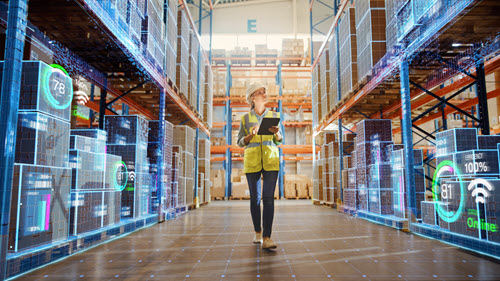
Since cycle counting is a manual process for most warehouses, it is highly dependent on disciplined and precise labor. Walking miles of warehouse aisles counting and recounting stored inventory is one of the least desirable assignments an associate can receive. Couple this tedious task with an increasingly difficult to hire workforce and it’s no wonder that inventory accuracy is an increasingly painful thorn in the side of warehouse operators today.
Cycle counting is not only expensive; it can also be disruptive to day-to-day operations. If a specific shelf and/or aisle is being audited, it becomes unavailable for picking or put away. Now just imagine how disruptive this could be for a 500,000 sq foot warehouse with 40ft high bays; this type of manual and time-consuming auditing brings operations to a grinding halt.
This process includes understanding the increments, decrements, locations, and even the condition of your stored goods. These accuracy rates are typically measured based on auditing conducted by warehouse associates, which is then compared with data found in your WMS. Due to the highly manual process of inventory cycle counting, most warehouses refrain from conducting audits as much as they would like to (at the detriment of their inventory accuracy).
Inventory Tracking Accuracy and Quality Validation for Inventory “Moves”
Two other significant areas of the warehouse that require inventory accuracy are the Inbound and Order Fulfillment workflows. In an inbound verification process, items received are usually scanned to enter into the WMS database and then validated against an ASN, but there is usually no way to verify the condition of the inventory item. Similarly, unless every outgoing order is validated manually, there are multiple opportunities for the order to be:

What is the Impact of Errors in Inventory Tracking?
Despite dedicating several full-time associates to perform storage cycle counting or to conduct quality audits during order fulfillment, there can still be be a multitude of errors in inventory accuracy in storage, picking, packing and shipping. These inaccuracies and errors directly impact the costs of operating the warehouse – and these can impact a Brand, a 3PL as well the manufacturers. Here below are a few examples of the costs incurred by 3PLs or Brands.

Every WMS depends on the input of inventory data from the moment goods enter the warehouse to the moment it leaves. Today, that input method is to have Associates scan barcodes on inventory or locations into a WMS. But this is woefully inadequate. With the large volume of material flowing in and out of warehouses, all forms of errors can occur:
To improve inventory tracking and reduce the number of errors, two things need to happen.
The process of capturing inventory – both in storage and moves – needs to be automated, so as to reduce the number of human touches
Inventory needs to be represented by much more than barcode. Today with just a barcode, there is no way to know:
1. The serial number of a product
2. The expiry date
3. Quantities inside a carton
4. The condition of an item simply by scanning a barcode
There needs to be a better way to “represent” the inventory item – which in turn will lead to more effective ways of managing inventory and reducing losses or quality related errors.
Automating the processes of inventory counting, inspections and validations has become the most reliable solution for improving accuracy and has also proven to be a more cost-effective option than unpredictable labor resources. This automation comes in the form of strategically placed and configured computer vision and sensors throughout the warehouse. These inventory tracking systems deliver THE TRUTH to a warehouse WMS in near real-time, ensuring that warehouses operate from the most accurate and up to date inventory data possible. You can now create a vision layer, or a true “digital twin”, reconciling the systematic movement of goods with their physical movement.
Some of the industry’s top 3PLs and most well-known global brands have been using Vimaan solutions throughout their warehouses to improve accuracy at every stage.
All of these solutions provide warehouses with a more exact view of their inventory accuracy than any other practice today. Each provide the truth based on their current real-time view of warehouse inventory. These automated solutions require less headcount to operate and provide greater levels of accuracy than manual process. As a simple example, current customers are now able to cycle count more than once a week with no impact on day-to-day operations. Unlike other warehouse automation solutions that deliver ROI in years, Vimaan delivers ROI in months.
To learn more as to how Vimaan can help improve your inventory accuracy, contact us today for a complimentary operational analysis.
warehouse insider

By Craig Dowley
In 2021, roughly 33% of the non-agricultural workforce quit their jobs. It’s a new record, at least since 2000 when the Bureau of Labor Statistics (BLS) started tracking “quit” rates. Granted, 33% sounds like a lot, but this has been an emerging trend, about 28% of the entire U.S. workforce also voluntarily left their jobs in 2020. In fact, this can be more than just a new trend and reflect the new normal; and as business owners we need to pivot or risk falling behind.
For warehouses and distribution centers, there have been specific labor challenges that predate the pandemic. As recorded by the Bureau of Labor Statistics (BLS), for the industrial sector that includes warehousing, turnover rates were at 40.3% in 2016 and 44.0% in 2018. Of course, it rose even higher during the pandemic, to 59.5% in 2020.
For a few years now, the logistics sector has been offering hiring bounties to attract new employees. Some warehousing employers offer free meals, daycare benefits, education reimbursement, and other benefits to increase employee satisfaction and decrease turnover. Vimaan customers have told us that throwing money at the problem does not address it long-term, or even mid-term for that matter.
Even with these incentives, warehouses continue to struggle due to increasing competition outside our industry. Other less labor-intensive jobs are available that did not exist 10 years ago. For example, working for companies like Uber, Door Dash, InstaCart and Lyft are providing workers with a more independent work/life balance all from the comfort of their own cars. Workers are becoming their own bosses and, in many cases, making more money than they would in the warehouse.
Automation has been coming on strong to cope with these labor shortage and attrition trends. For example, order-picking is a labor-intensive warehouse task and even more so with the rise of eCommerce. Autonomous Mobile Robots (AMRs) that automate the traveling within the warehouse relieve employees of the burden of walking 10 to 15 miles per day. Studies have shown employees like the robots and appreciate being able to offload some of the dull and exhausting tasks to their mechanical associates. So, while there have been advances in automation in the area of order picking, there are other labor-intensive jobs that warehouses need to digitize in order to stay competitive, and reduce their reliance on the increasingly fickle workforce.
In contrast to the order-picking automation, maintaining accurate inventory counts has remained a labor-intensive task. Most warehouses have a goal of taking stock twice per year, and many don’t make it. Manual inventory auditing is intrusive to the day-to-day operations of a warehouse. In many cases, workers need to climb ladders and use paper-based methods to record inventory. Even if associates use handheld barcode scanners, it’s still exhausting and tedious work. It is also prone to human error. The impact of skipping audits is felt throughout the year with lost inventory, mis-shipments, missed sales opportunities, delayed order fulfillment, and costly write offs. Some warehouse managers see this as a cost of doing business, but it doesn’t have to be.
Inaccurate inventory comes with high costs. An employee tries to fill an order, relying on erroneous data. When the item is not there, the order-picker asks for help from the supervisor, who now has to take time to find the item in the warehouse. Meanwhile, the truck waits at the shipping dock for the shipment to be ready, or the production line goes idle, waiting for that missing part. All of this is wasted time, leads to unhappy customers, and, worst of all, wasted budget. This all makes inventory tracking a prime candidate for automation.
Over the last few years Vimaan has partnered closely with our blue-chip customers to understand their inventory management pains and how automation could alleviate these specific challenges. This time investment has led to the development of computer vision solutions that bring inventory tracking to a whole new level. For example, by using Vimaan tracking technology, 3 out of the top 5 distribution companies have been able to reduce their inventory audit and search related spend by 75%! Additionally, the inventory accuracy of these warehouses have universally jumped to nearly 100%, so the savings keep on coming!
Vimaan customers are seeing the great resignation as a great opportunity to stop the vicious hiring and attrition cycle. Instead of investing in recruiters, hiring bonuses and continuous training cycles, these companies have embraced automation to tackle their inventory management roles and the results have been staggering:
And most important these Vimaan customers have seen a return on their investment in months, not years!